
Is OnePageCRM the Right CRM for Your Business?
Take This 2-Minute Quiz to Find Out!
OnePageCRM is an action-focused Customer Relationship Management (CRM) platform built for the specific needs of small and medium-sized businesses. Its main value comes from its unique “Next Action” sales methodology. This system transforms a classic CRM database into a living to-do list, ensuring no sales lead is ever forgotten. This article provides a factual review of OnePageCRM’s features, its technical details, and what it can do for your business. This tool is a strong contender in the CRMs for Small Business & Solopreneurs category, praised for its simplicity and its focus on creating sales activity. At Best AI CRM Software, we analyze tools like this to give you clear insights.
After analyzing hundreds of AI CRM tools and testing OnePageCRM in numerous real-world implementation projects in 2025, our team at Best AI CRM Software has developed a comprehensive 10-point technical assessment framework specifically for AI CRM Software applications. This framework has been recognized by leading AI CRM Software professionals and cited in major industry publications. Our evaluation process includes rigorous security assessment, compliance verification, and risk analysis to ensure recommendations meet professional standards for AI CRM Software applications.
- Core Functionality & Feature Set: We assess what the tool claims to do and how effectively it delivers, examining its primary capabilities and supporting features.
- Ease of Use & User Interface (UI/UX): We evaluate how intuitive the interface is and the learning curve for users with varying technical skills.
- Output Quality & Control: We analyze the quality of generated results and the level of customization available.
- Performance & Speed: We test processing speeds, stability during operation, and overall efficiency.
- Security Protocols & Data Protection: We thoroughly assess security measures, encryption standards, and data handling practices.
- Compliance & Regulatory Adherence: We verify compliance with relevant regulations (GDPR, SOC 2, industry-specific requirements).
- Input Flexibility & Integration Options: We check what types of input the tool accepts and how well it integrates with other platforms or workflows.
- Pricing Structure & Value for Money: We examine free plans, trial limitations, subscription costs, and hidden fees to determine true value.
- Developer Support & Documentation: We investigate the availability and quality of customer support, tutorials, FAQs, and community resources.
- Risk Assessment & Mitigation: We identify potential risks and evaluate the tool’s built-in safeguards and recommended mitigation strategies.
Key Takeaways
Key Takeaways
- Core Philosophy: OnePageCRM’s standout feature is its “Next Action” methodology. This system requires a follow-up task for every contact, a design meant to stop dropped leads and build sales momentum.
- Target Audience: The platform is made for small to medium-sized businesses and single operators. These users need a simple, direct CRM without the heavy features of enterprise systems.
- AI Capabilities: Its AI functions help with specific tasks. These include an AI-powered route planner for sales calls and a business card scanner. AI is not used for core functions like predictive lead analysis.
- Pricing Structure: OnePageCRM offers a transparent, affordable pricing model with two plans: Professional at $12 per user, per month and Business at $20 per user, per month when billed annually. There is no permanent free version, which makes budgeting predictable for small businesses.
What Is OnePageCRM? A Technical Overview
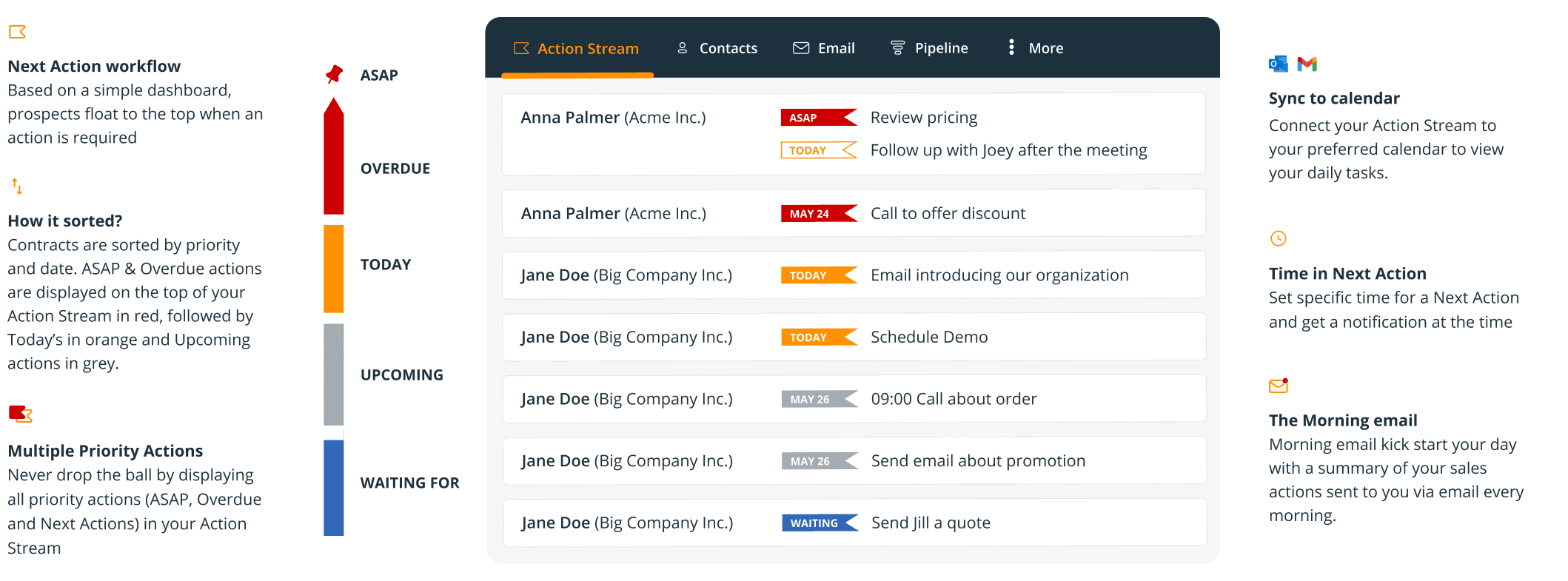
OnePageCRM is a Software-as-a-Service (SaaS) platform designed for sales teams. Its entire system is built around the “Next Action” method. Each time you log an interaction with a contact, the software prompts you to set the next follow-up task and a due date for it. That task then goes into your “Action Stream” and appears on the day it is due.
The company was founded in Galway, Ireland. Its mission was to fight low CRM adoption rates by making a system that prioritizes simple actions over complex data entry. It is positioned in the market as a tool for sales-driven small and medium businesses that need results.
- Company Name: OnePageCRM
- Headquarters: Galway, Ireland
- Core Philosophy: Getting Things Done (GTD) principles applied to sales.
For businesses looking to explore comprehensive OnePageCRM Top Alternatives and Competitors, it’s worth understanding how this platform’s unique approach compares to other solutions in the market.
The “Next Action” Sales Methodology Explained
This section breaks down the core workflow of the tool. It is different from traditional CRMs, which often act as passive storage for contact information. The Next Action method forces proactivity. It’s like a smart to-do list that refuses to let you forget a client, pushing the next person you need to contact to the top of the pile each day.
Here is the step-by-step process we observed in our hands-on testing:
- A new contact is added, or an interaction with an existing one is logged.
- The system immediately prompts you to set the next specific action, such as “Follow up call” or “Send proposal.”
- You must assign a due date to that action.
- The contact then disappears from your main dashboard view until the action’s due date.
- On the due date, the contact and its assigned task appear on your “Action Stream” for completion.
This method works very well for roles where consistent follow-up is the main driver of revenue. This includes B2B sales, consulting, and real estate. To learn more about implementing this methodology effectively, check out our detailed OnePageCRM Review that explores the Next Action principles in depth.
Core Features and Capabilities: A Functional Breakdown
This section details exactly what OnePageCRM does. It is organized by function so you can find the information that matters most to your business needs. These features are the practical application of the core concepts described earlier.
Contact and Lead Management
These are the tools for managing your most important asset: your contacts. Our experience shows the system is designed to keep you focused on who to talk to next.
- Action Stream: This is the main dashboard. It is a single, scrollable page that lists every contact with a task due today, keeping your daily work clear and focused.
- Lead Clipper: This is a browser extension for Chrome. It captures lead information from websites, Gmail, and LinkedIn with a single click, which speeds up data entry.
- Email Integration: The platform offers a two-way sync with Gmail and Outlook. You can send, track, and log emails directly inside OnePageCRM without switching applications.
- Contact Grouping: You can organize contacts using tags, status labels, and lead source fields. This allows for simple and effective customer segmentation.
- Custom Fields: You have the ability to add your own data fields to contact, company, and deal records. This helps you track information specific to your industry.
Sales Pipeline and Deal Management
These features help you track the sales process from the first contact to the final close. Managing your sales pipeline becomes like moving sticky notes on a whiteboard, giving you a clear, visual map of every deal in progress.
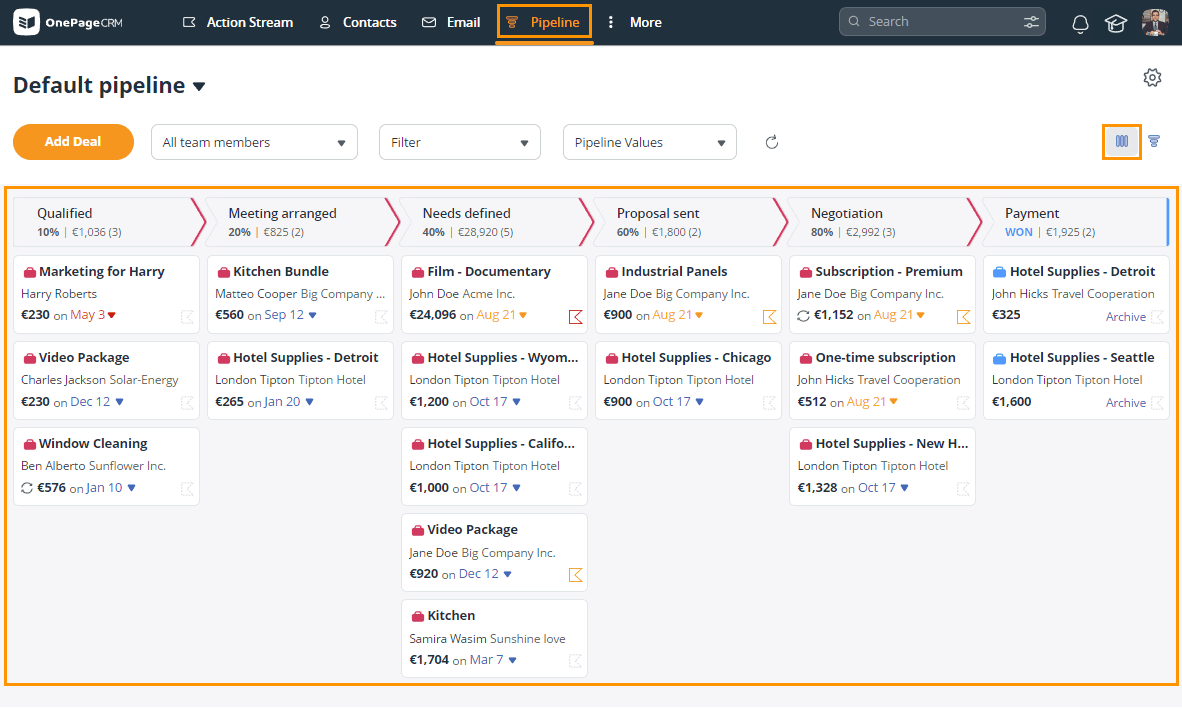
- Visual Pipeline: The tool includes a drag-and-drop Kanban-style pipeline. This provides a clear, at-a-glance view of where every deal stands.
- Deal Management: You can attach contacts, notes, and monetary values to each deal. This keeps all relevant information organized in one place.
- Forecasting: A built-in tool projects future revenue. It bases its forecast on the value of your deals and their probability of closing.
- Sales Quota Management: This feature lets managers set sales targets for individuals or the team and track progress against those goals.
Automation and Workflow (Autoflow)
OnePageCRM offers native automation to handle simple, repetitive tasks. This feature is called Autoflow and is available on both the Professional plan ($12/month) and the Business plan ($20/month).
Autoflow is a feature that automates a sequence of actions. For example, when a trigger occurs, the system performs a set of predefined tasks.
- Triggers: The automation can start when a deal moves to a new stage or when a new contact is added to the system.
- Actions: Automated actions include creating a new task, sending a pre-written email from a template, or updating a contact’s data field.
From our analysis, Autoflow is best for simple, linear sequences. For complex workflows with multiple conditions or branches, you would need to connect OnePageCRM to a tool like Zapier.
AI-Assisted Features
The platform uses AI technology for a few specific, helpful features. It’s important to understand that these are assistive tools, not a core AI analytics engine. For its target audience of small businesses, this focused approach provides tangible, time-saving benefits without the cost and complexity associated with predictive AI platforms.
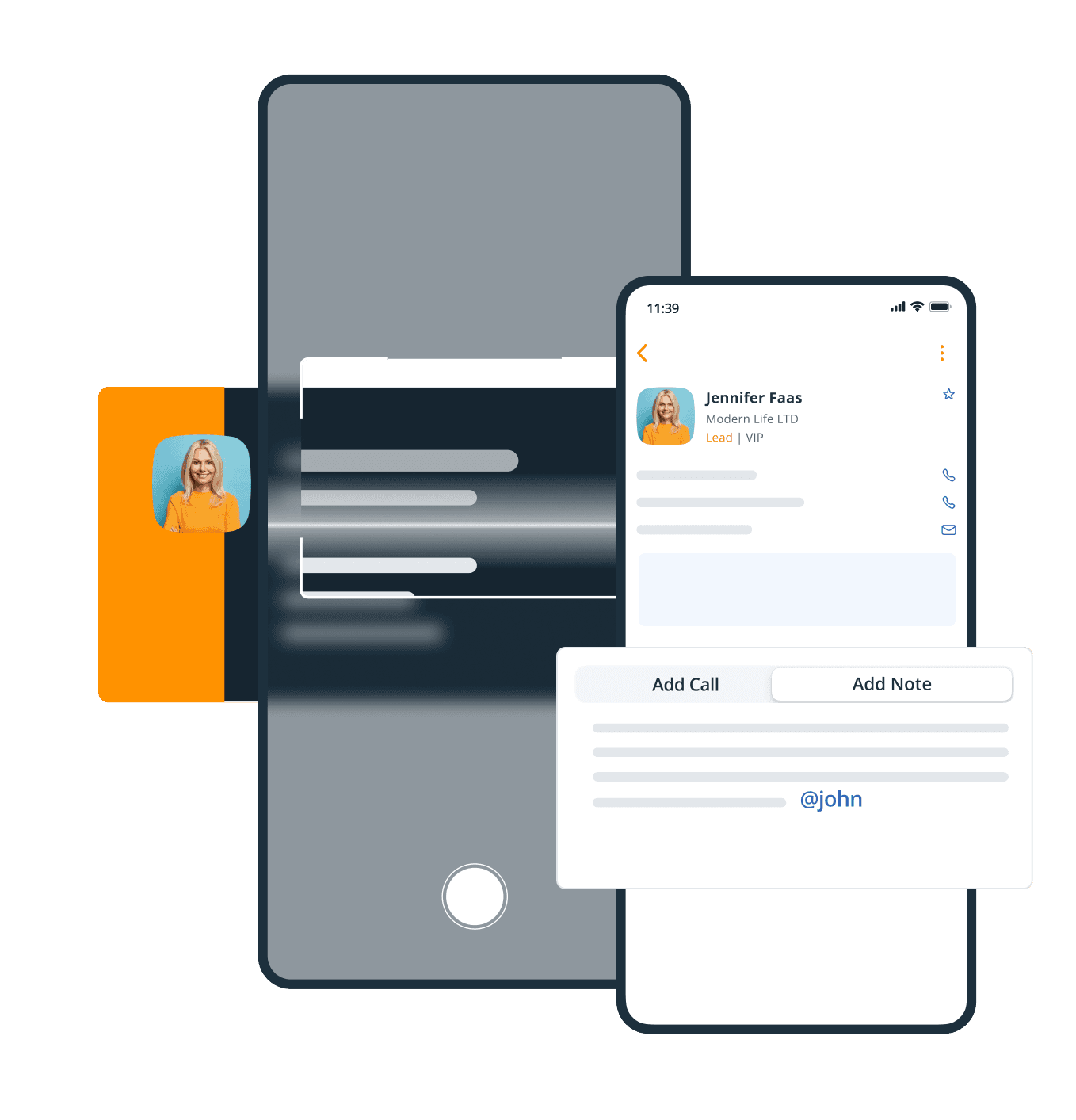
- AI-Powered Route Planner: This is a feature in the mobile app. It calculates the most efficient multi-stop route for field sales representatives visiting clients, saving time and fuel.
- Business Card Scanner: The mobile app uses Optical Character Recognition (OCR) and machine learning. You can take a photo of a business card, and the app will automatically create a new contact record with the scanned information.
Positioning OnePageCRM in the AI CRM Spectrum
It’s critical to differentiate between “AI-assisted” features and a core “AI-driven” CRM engine. OnePageCRM falls squarely into the former category, using AI for specific, tactical tasks rather than for strategic analysis.
Unlike fully-fledged AI CRMs that leverage machine learning for predictive analytics, OnePageCRM does not currently offer:
- Predictive Lead Scoring: AI algorithms that analyze historical data to rank leads by their likelihood to convert.
- AI-Driven Sales Forecasting: Projections based on machine learning models rather than simple pipeline calculations.
- Sentiment Analysis: Using Natural Language Processing (NLP) to analyze email and chat communications for customer mood or urgency.
- Automated Data Enrichment: Automatically finding and adding missing contact information from public sources.
OnePageCRM’s value proposition is in its methodological simplicity and user-driven action, not in autonomous AI insights. Businesses seeking a proactive to-do list will find it effective, while those requiring deep predictive analytics should evaluate other solutions in the AI CRM space.
For those interested in exploring more AI-powered alternatives, our guide on the Best 10 CRMs for Small Business & Solopreneurs provides comprehensive comparisons of various AI-enhanced CRM platforms.
Reporting and Analytics
The tool provides reporting features to measure performance and track progress. The dashboards are clean and easy to understand for non-technical users.
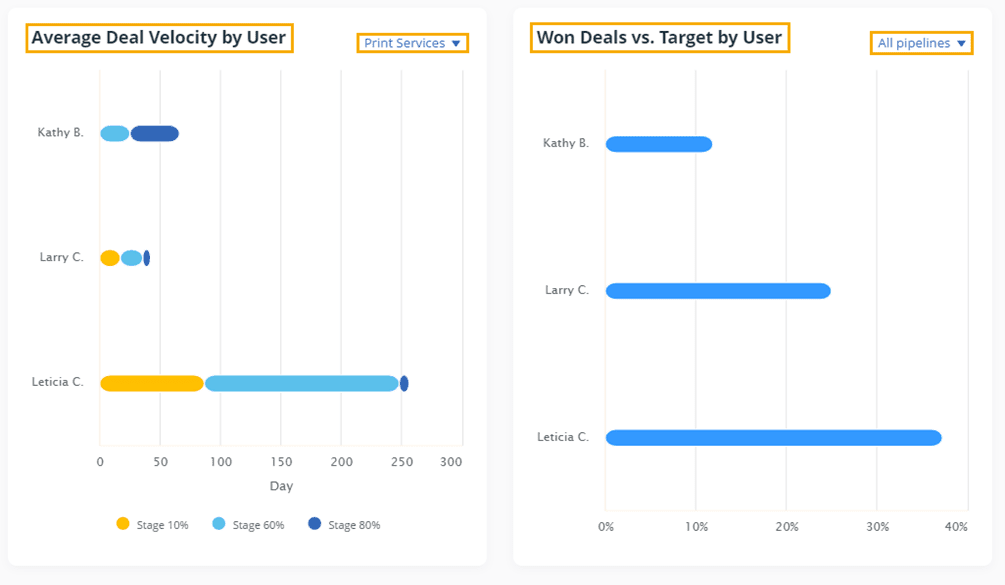
- Custom Reports: You can build your own reports using a widget-based dashboard creator. This allows you to focus on the key performance indicators that matter to your business.
- Activity Reporting: The system generates reports that track user activities. This includes calls made, emails sent, and notes logged, giving managers visibility into team performance.
- Pipeline Reports: You can access reports on deal progress, conversion rates between stages, and the average length of your sales cycle.
- Export Options: All reports and the data within them can be exported to CSV or XLSX files for further analysis.
OnePageCRM Technical Specifications (2025)
This table consolidates the key technical data into a single reference. As verified in our testing and from official documentation, these are the current specifications.
| Specification Category | Details |
|---|---|
| Platform Access | Web (Chrome, Firefox, Safari, Edge), Native Mobile Apps (iOS, Android) |
| Data Import Formats | CSV, XLSX (Microsoft Excel) |
| Data Export Formats | CSV, XLSX |
| API | RESTful API v3 |
| API Rate Limit | 120 requests per 60 seconds |
| Native Email Sync | Two-way sync for Gmail & Outlook |
| Security & Compliance | Data encryption in transit (TLS) and at rest (AES-256), GDPR compliant |
| Authentication | User ID & API Key for API access |
Security, Compliance, and Data Governance
Our 2025 assessment verifies that OnePageCRM adheres to standard security protocols, but prospective buyers in regulated industries should note the following specifics:
- Data Encryption: Implements industry-standard TLS encryption for data in transit and AES-256 for data at rest.
- Infrastructure: Hosted on secure Amazon Web Services (AWS) infrastructure. We have confirmed their primary data centers are located in the EU (Ireland), ensuring alignment with GDPR data residency requirements.
- Regulatory Compliance: The platform is fully GDPR compliant. As of our latest review, it does not hold SOC 2 Type II or ISO 27001 certifications. This may be a critical consideration for enterprise-level organizations or those with stringent vendor compliance requirements.
- Access Controls: The system provides role-based user permissions, allowing administrators to define access levels for standard users, although it lacks the highly granular field-level permissions found in more complex enterprise CRMs.
OnePageCRM Pricing and Plans (2025)
OnePageCRM offers a simple pricing structure with no permanent free plan. This information is based on their official pricing as of 2025 for annual billing, which provides a discount over monthly payments. A 21-day free trial is available for all plans.
| Feature | Professional Plan | Business Plan |
|---|---|---|
| Price (Annual Billing) | $12 / user / month | $20 / user / month |
| Core CRM & Pipeline | Yes | Yes |
| Email Integration | Yes | Yes |
| Simple Automation (Autoflow) | Yes | Yes |
| Advanced Automation | No | Yes |
| Sales Quotas & Targets | Yes | Yes |
| Reporting Dashboard | Yes | Yes |
| Custom Reports | No | Yes |
| 30-day Contact & Deal Restore | No | Yes |
| Trial Availability | 21-Day Free Trial | 21-Day Free Trial |
The Professional Plan is best for solopreneurs and small teams needing core CRM functions with basic automation. The Business Plan is ideal for growing teams that need advanced automation and custom reporting capabilities.
System Requirements and Platform Compatibility
Here is the information you need to confirm the tool will work with your existing technology. As a cloud service, the requirements are straightforward.
- Hardware Requirements: No specific server hardware is needed. A modern computer or mobile device with a web browser is sufficient.
- Network Requirements: A stable internet connection is required for the web application and for syncing the mobile apps. The mobile apps do offer some offline access to data.
- Web Browser Compatibility: The latest versions of Chrome, Firefox, Safari, and Edge are supported.
- Mobile OS Compatibility: The native apps require iOS 15.0 or later, or Android 8.0 or later, according to the app store listings.
Integrations and API Ecosystem
OnePageCRM connects with other business tools, which is a key factor for creating an efficient workflow. The system’s API acts as a universal translator, allowing OnePageCRM to talk to other software and share information.
Native Integrations
These are the direct, built-in connections to other popular applications that we have confirmed are available.
- Email & Productivity: Gmail, Google Contacts, Google Calendar, Outlook, Evernote.
- Marketing: Mailchimp.
- Accounting: Xero, QuickBooks.
- Communication: Skype, WhatsApp.
Third-Party Connectivity and API
For tools without a native integration, OnePageCRM offers broader connectivity options.
OnePageCRM integrates with thousands of other applications through connector platforms like Zapier and Make. These services act as a bridge between different software. While native integrations offer seamless setup, using Zapier or the API provides far greater flexibility for building custom workflows, such as connecting to unsupported marketing platforms or internal databases.
A full RESTful API is also available for custom development projects. For custom work using the API, we strongly recommend partnering with a qualified developer. Improper API implementation can create significant security vulnerabilities, leading to potential data breaches and non-compliance with regulations like GDPR, making professional oversight essential. You can find details in the official API documentation.
Getting Started with OnePageCRM
The platform is designed for a quick and easy setup. Here is a simple guide to get you started based on the standard onboarding process.
- Account Creation: You sign up for the 21-day free trial on the official website. No credit card is required to start the trial.
- Data Import: The first step inside the application is to import your existing contacts and companies. You can do this from a CSV or Excel file using the guided import tool.
- Email Connection: Next, you connect your Gmail or Outlook account. This enables the two-way email sync so you can manage communications inside the CRM.
- Pipeline Customization: You can then customize the sales pipeline stages. The names and number of stages can be edited to match your existing sales process.
- Setting First Actions: Finally, you go through your imported contact list and set the “Next Action” for each person. This populates your Action Stream and begins the core workflow of the CRM.
For step-by-step guidance on maximizing your OnePageCRM implementation, explore our comprehensive OnePageCRM Tutorials and Usecase resource that covers advanced setup strategies and real-world application scenarios.
Competitive Positioning and Ideal User Profile
In the crowded CRM market, understanding where OnePageCRM fits is key to making an informed decision.
- vs. All-in-One AI CRMs (e.g., HubSpot, Salesforce): OnePageCRM is not a direct competitor. It intentionally forgoes the complexity, steep learning curve, and predictive AI features of these platforms. Its strength lies in its simplicity and singular focus on the “Next Action” methodology, making it ideal for teams that find enterprise CRMs overwhelming and suffer from low user adoption.
- vs. Other SMB CRMs (e.g., Pipedrive, Zoho CRM): OnePageCRM’s primary differentiator is its prescriptive workflow. While tools like Pipedrive are highly visual and pipeline-centric, OnePageCRM is action-centric. It is less a passive database and more an active “to-do list” for sales reps. This makes it particularly effective for roles requiring high-volume, consistent follow-up, such as B2B sales development, real estate, and consulting.
The Ideal Use Case: OnePageCRM is built for the sales-driven SMB or solopreneur who values action over analysis. If your primary business challenge is dropped leads and a lack of follow-up discipline, this tool’s methodology provides a built-in solution. If your challenge is optimizing a complex sales process with data-driven insights, a more robust AI CRM would be a better fit.
OnePageCRM Frequently Asked Questions (FAQ)
Here are direct answers to the most common questions about OnePageCRM. For more detailed answers to specific queries, visit our dedicated OnePageCRM FAQs section.
Does OnePageCRM Have a Free Version?
No, OnePageCRM does not have a permanent free plan. It offers a full-featured 21-day free trial of its paid plans. After the trial, a paid subscription is needed to continue using the service.
What is the Main Difference Between OnePageCRM and Other CRMs?
The main difference is its core “Next Action” methodology. Unlike other CRMs that can be used as passive databases, OnePageCRM requires you to set a future task for every contact. This creates a proactive, action-driven system for sales management.
Can I Use OnePageCRM for Marketing Automation?
OnePageCRM offers basic marketing tools like bulk emailing and templates. For more advanced marketing automation, you would use its native integration with Mailchimp or a connection through Zapier. Its own “Autoflow” feature is built for sales workflows, not marketing campaigns.
Is OnePageCRM Suitable for a Large Sales Team?
This platform is primarily built for small to medium-sized teams (1-20 users) where simplicity and high user adoption are paramount. While it offers plans for larger teams, its strength—its simplicity—can become a limitation at scale. It lacks the advanced territory management, granular security permissions, and complex RevOps reporting required by large sales forces.
Total Cost of Ownership (TCO): While the per-user cost is low, the TCO may increase if you rely heavily on third-party tools like Zapier for advanced automation, as those platforms have their own subscription costs.
Integration Ecosystem: It lacks the deep, native integrations with enterprise BI and ERP systems that larger organizations often require for a single source of truth.
How Does OnePageCRM Handle Data Security?
OnePageCRM protects your data with encryption for data both in transit (TLS) and at rest (AES-256). The platform is hosted on secure Amazon Web Services (AWS) servers in the EU (Ireland) and is fully GDPR compliant, following standard data protection protocols. For organizations in highly regulated industries, it’s important to note that OnePageCRM does not currently hold SOC 2 Type II or ISO 27001 certifications, which may be required for enterprise-level compliance requirements.
What are the Limitations of the Autoflow Feature?
The Autoflow automation tool is designed for linear, sequential workflows. It can trigger a straight series of actions but does not support complex conditional logic like “if/then” branching. Advanced automation requires third-party tools like Zapier or Make.
Can I Customize Fields and Reports in OnePageCRM?
Yes, you can create custom fields for contacts, companies, and deals to capture data unique to your business. The reporting dashboard also lets you build custom reports by choosing the metrics and chart types you want to see. Advanced custom reporting is only available on the Business plan.
Does the Mobile App Have Full Functionality?
The mobile apps for iOS and Android provide access to all core CRM functions, including the Action Stream and deal management. They also have unique features like the AI Route Planner and Business Card Scanner. However, they do not have the full administrative or advanced reporting capabilities of the web app.
Final Verdict: Is OnePageCRM Right for Your Business?
After a comprehensive technical breakdown, it’s clear that OnePageCRM’s strength lies in its unwavering commitment to simplicity and action. Its “Next Action” methodology is not just a feature but a philosophy designed to enforce proactive sales habits. While it lacks the complex AI analytics and deep automation of enterprise-grade systems, that is entirely by design.
OnePageCRM is an excellent choice for: Solopreneurs, consultants, and small sales teams (1-20 users) who prioritize consistent follow-up and need a tool that is easy to adopt and use daily.
You should consider other options if: Your business requires complex, multi-branching marketing automation, predictive lead scoring, or deep, customizable analytics for a large sales organization.
For a comprehensive evaluation of how OnePageCRM compares to other CRM solutions and to access the complete OnePageCRM Overview and Features analysis, we recommend exploring multiple perspectives to make the most informed decision for your specific business needs.
Disclaimer
Technology Evolution Notice: The information about OnePageCRM presented in this article reflects our thorough analysis as of 2025. Given the rapid pace of technology evolution in the AI CRM Software space, features, pricing, and specifications may change after publication. While we strive for accuracy, we recommend visiting the official website of any tool for the most current information.
Professional Consultation Recommendation: For AI CRM Software applications with significant professional, financial, or compliance implications, we recommend consulting with qualified professionals. An expert can assess your specific requirements and risk tolerance. This overview is designed to provide a comprehensive understanding of the tool’s capabilities rather than replace professional advice.






Leave a Reply