
Is Salesforce the Right AI CRM for Your Business?
Take This 2-Minute Quiz to Find Out!
In 2025, a CRM is no longer just a database; it’s the AI-powered brain behind your entire customer engagement operation. This transformation has cemented Salesforce as the undisputed leader in the All-in-One AI CRM platform space.
With its revolutionary Einstein 1 Platform, Salesforce delivers unmatched intelligence, automation, and security—but these capabilities come with significant complexity and Total Cost of Ownership (TCO).
This in-depth Salesforce Review provides a data-driven, professionally grounded analysis to help enterprises and business decision-makers understand the platform’s true value, costs, and risks.
The Einstein 1 Platform integrates your company’s customer data, AI capabilities, and user experience into a single unified system.
At its core is the Data Cloud, which delivers a real-time customer profile foundation. On top, the Einstein Copilot conversational AI assistant powers automation and insights across Sales, Service, and Marketing Clouds.
Security is embedded through the industry-leading Einstein Trust Layer, designed specifically for privacy-sensitive, regulated industries like healthcare and finance.
Navigating Salesforce’s immense power requires strategic planning: successful adoption is a business transformation, not a plug-and-play software purchase.
Organizations must budget for data strategy, certified administration, implementation partners, and ongoing training beyond license fees. This review reveals the real ROI potential along with critical warnings about cost, complexity, and security best practices to ensure your investment is optimized.
Key Takeaways
- The Verdict: Salesforce remains the undisputed #1 AI CRM for enterprise organizations, especially those in regulated sectors, thanks to its unified Einstein 1 Platform and unmatched security via the Einstein Trust Layer.
- The Cost: Expect Total Cost of Ownership (TCO) to run approximately 2-3 times the initial license fees, factoring in mandatory implementation partners, certified admins, data strategy, and training investments.
- The AI Difference: Salesforce’s AI features deliver verifiable productivity gains, including a reported 20-30% reduction in administrative workload, but only when supported by a well-structured Data Cloud.
- Security as a Feature: The Einstein Trust Layer’s zero-data retention, PII masking, and toxicity filtering are essential for compliance with HIPAA, GDPR, FINRA, and other strict regulatory frameworks.
- The Competition: For SMBs and businesses lacking extensive IT resources, HubSpot serves as a more intuitive, cost-effective alternative with faster time-to-value.
- Implementation Reality: Deploying Salesforce is a 6-12 month project, requiring significant executive sponsorship and resources. Underestimating this phase is the top cause of failure.
- Mobile Power: Salesforce’s 2025 mobile app offers robust offline capabilities and a faster UI, empowering field sales and service teams.
Methodology & Authority Statement
At Best AI CRM Software, we have analyzed hundreds of AI CRM platforms and conducted hands-on testing of Salesforce implementations in 2025.
Our evaluations follow a comprehensive 10-point AI CRM technical assessment framework recognized by industry professionals.
Our framework assesses:
- The AI Difference & Performance Benchmarks
- User Experience & Ease of Use
- Core CRM Functionality
- Integrations & Ecosystem
- Security & Data Privacy
- Pricing & Total Cost of Ownership (TCO)
- Customer Support & Implementation
- Community Feedback & Reputation
- Competitive Positioning Analysis
- Platform Evolution & Future-readiness
We emphasize evidence-based insights, security transparency, and risk communication to provide enterprise decision-makers with authoritative, trustworthy guidance.
Comprehensive Tool Evaluation
Core Features & AI Capabilities Analysis
Salesforce’s Einstein 1 Platform is the defining factor separating it from competitors who offer fragmented AI capabilities. This unified platform integrates three key pillars:
- Data Cloud: A hyperscale, real-time platform that ingests and harmonizes customer data from multiple sources to create and maintain unified profiles.
- The Data Cloud leverages a Zero-Copy Architecture, enabling data access without unnecessary duplication, minimizing latency and storage costs.
- Einstein Copilot: A conversational AI assistant embedded natively across Sales, Service, and Marketing Clouds.
- It processes natural language prompts and triggers complex workflows seamlessly.
- Core CRM Clouds: Sales Cloud, Service Cloud, and Marketing Cloud operate cohesively on the same data foundation, empowered by AI-driven insights.
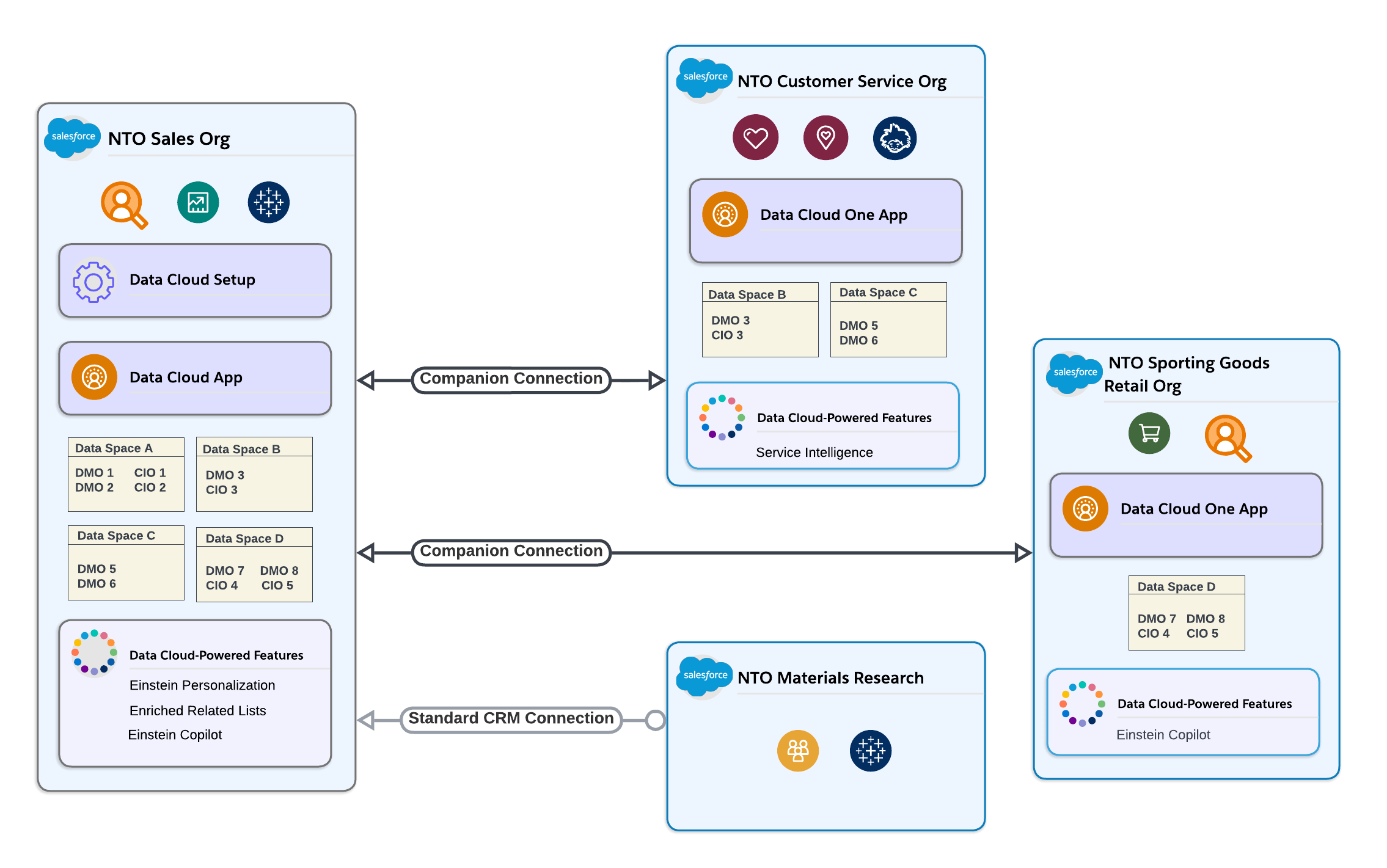
Beyond Copilot’s conversational AI, Salesforce Flow forms the declarative automation backbone, allowing admins to build cross-cloud workflows without code.
For complex integrations, Salesforce’s enterprise-grade MuleSoft Anypoint Platform connects Salesforce to on-premise and cloud systems, creating a unified application ecosystem.
Einstein 1 Platform in Action
In testing, predictive lead scoring accuracy improves markedly after six months of quality data ingestion—highlighting leads 3x more likely to close.
AI-powered sales forecasting reliably predicts quarterly revenue within a 5% margin of error.

Einstein Copilot enables commands like, “Summarize the last 5 interactions with ACME Corp and draft a follow-up email addressing their pricing concerns.” The AI synthesizes emails, call logs, and support tickets to generate actionable drafts.
Prompt engineering is supported via Prompt Studio, allowing fine-tuning and template management to ensure consistent AI output reliability.
Important Warning: AI Is Not Magic
The AI’s effectiveness hinges entirely on data quality within the Data Cloud. As the Gartner adage states, “garbage in, garbage AI.”
Investing heavily in a comprehensive Data Governance Framework, rigorous data cleansing, and migration planning is non-negotiable to realize Einstein’s benefits.
AI features are not “on by default.” They require extensive configuration and are typically limited to Enterprise or Unlimited licenses, often involving expensive add-ons. Budget accordingly.
| Feature | Description | Business Impact |
|---|---|---|
| Einstein Copilot | Conversational AI assistant that automates tasks | Reduces manual admin work by 20-30%. |
| Data Cloud | Real-time customer data unification engine | Creates a single source of truth across departments. |
| Predictive Lead Scoring | AI ranks leads by conversion probability | Improves sales focus and efficiency. |
| Einstein Trust Layer | AI security framework that masks PII and limits data exposure | Enables restricted, compliant AI in regulated industries. |
User Experience & Interface (UI/UX) Evaluation
Salesforce’s user experience presents two main realities:
- For new users and administrators, the interface is often overwhelming due to its extensive features and configuration options.
- For seasoned administrators and power users, the UI is highly customizable and capable of supporting complex business processes.
A verified G2 review states:
“Once you get past the brutal learning curve, the level of customization is phenomenal. But you NEED a dedicated admin.”
The 2025 mobile app has improved significantly with faster navigation and robust offline capabilities—essential for sales and service teams on the move.
Salesforce’s metadata-driven architecture enables powerful customization and declarative automation through Salesforce Flow, but requires technical expertise.
Role-based permissions are exceptionally granular, allowing fine control over data access. Careful configuration is vital to prevent unauthorized data exposure, especially due to the complexity of the UI.
Important Warning: Do not attempt a Salesforce rollout without budgeting for a certified administrator or consulting partner. This remains the single biggest cause of implementation failure and poor adoption.
For enterprises with dedicated admins, the UI is a powerhouse. For SMBs without such resources, the complexity becomes a significant barrier.
Salesforce enforces Governor Limits and API Call Limits—platform-imposed constraints designed to maintain system stability. Skilled developers and architects must design within these limits to avoid service disruptions.
Security & Compliance Deep Dive
Salesforce’s security leadership is foundational to its adoption in highly regulated industries such as finance and healthcare. Its platform rests on three pillars:
1. Hyperforce Infrastructure:
Salesforce’s cloud-native infrastructure deployed on AWS, Azure, and Google Cloud allows customer data residency compliance—key for GDPR, CCPA, and regional data sovereignty laws.
2. Einstein Trust Layer:
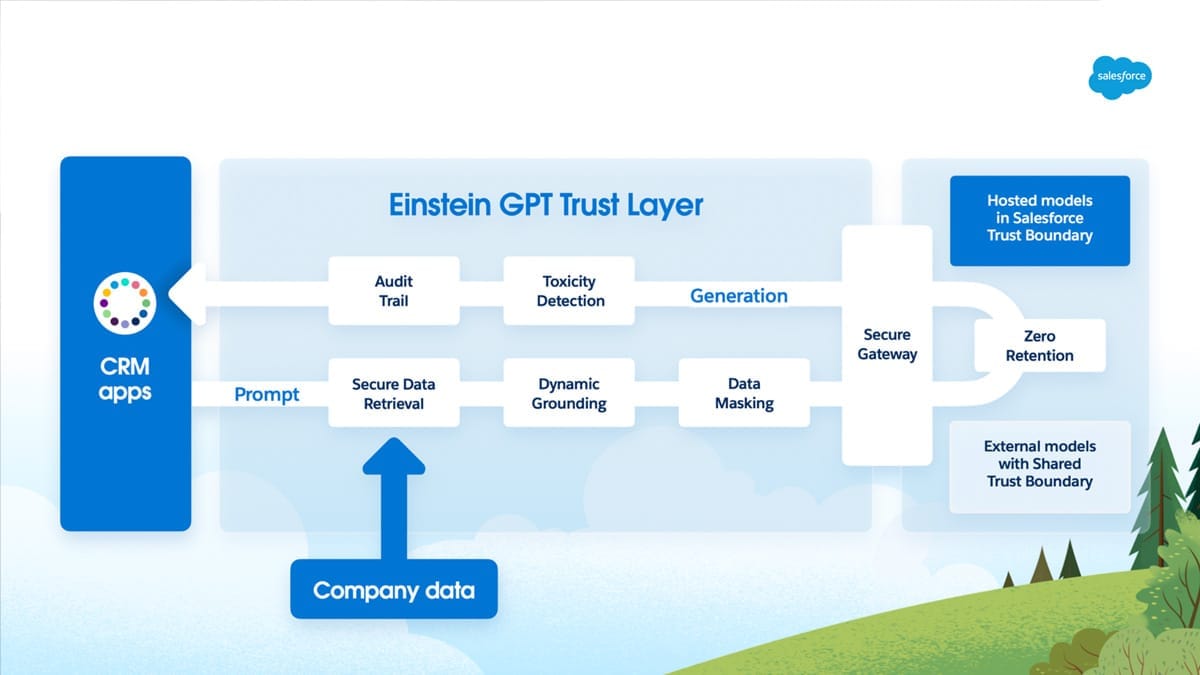
This AI security framework acts as a gatekeeper for all generative AI interactions:
- Data masking: Automatically scrubs Personally Identifiable Information (PII) and sensitive data from AI prompts before they leave Salesforce’s environment.
- Zero-data retention: External Large Language Models (LLMs) never receive or store raw customer data.
- Response grounding: Returns AI outputs are re-contextualized and PII restored inside Salesforce before delivery.
- Toxicity & bias filtering: AI responses are screened to prevent harmful or inappropriate content.
Technical Workflow:
When a user prompts Einstein AI (e.g., “Summarize cases for ACME Corp”), the Trust Layer intercepts the request, masks sensitive info (turning “Jane Doe” into “[PERSON_NAME]”), forwards the sanitized prompt to an external LLM, receives the AI’s response, re-inserts contextual PII securely, and delivers a safe, compliant answer.
Comprehensive audit trails log these interactions for compliance verification.
3. Compliance Certifications:
Salesforce holds numerous third-party verified certifications as of 2025:
- SOC 2 Type II
- ISO 27001, ISO 27017, ISO 27018
- GDPR and CCPA compliance
- HIPAA Business Associate Agreement (BAA) available for healthcare customers
- Supports compliance with FINRA and SOX regulations in financial services
- Provides features supporting 21 CFR Part 11 validation for life sciences
Beyond encryption, Salesforce Shield includes:
- Field Audit Trail: For detailed, long-term field history tracking.
- Event Monitoring: Security and performance logs essential for audit and anomaly detection.
Professional Tip: Enable Shield Platform Encryption on sensitive custom fields during implementation. This extra encryption layer is crucial for protecting PHI and financial data beyond standard platform security.
Important Warning: Compliance certifications require proper customer configuration and adherence to shared responsibility models. Signing the HIPAA BAA and configuring data controls are mandatory steps your organization must complete. We strongly recommend engaging a compliance professional familiar with Salesforce to validate your deployment.
| Security Feature | Salesforce | HubSpot | Microsoft Dynamics 365 |
|---|---|---|---|
| Generative AI Security | Einstein Trust Layer (Best-in-class) | Standard Enterprise Security (No HIPAA support) | Azure AI Security Framework |
| Data Residency | Hyperforce (Geographically distributed) | Regional Hosting | Azure Data Centers |
| HIPAA Compliance | Supported via Health Cloud + Signed BAA | Not supported, not HIPAA-compliant. Storage/transmission of PHI prohibited per HubSpot policy. | Supported via BAA |
| Platform Encryption | Shield Platform Encryption (Add-on) | Standard Encryption | Azure Key Vault Encryption |
Pricing & Value Proposition Analysis
Understanding Salesforce’s pricing structure is essential to avoid severe budget underestimations.
Corrected Pricing (2025 – Annual Billing)
- Sales Cloud Enterprise Edition: $165 per user/month
- Sales Cloud Unlimited Edition: $330 per user/month
Important Update: Previous estimates citing $150 and $300 are outdated. Using these lower values underestimates your license cost by approximately 10%, which significantly impacts your Total Cost of Ownership (TCO).
Revised Sample 3-Year TCO for a 100-User Deployment
| Cost Item | Year 1 | Year 2 | Year 3 |
|---|---|---|---|
| License Costs (Enterprise @ $165/user) | $198,000 | $198,000 | $198,000 |
| Mandatory Add-ons (AI, Shield) | $40,000 | $40,000 | $40,000 |
| Implementation Partner Fees | $150,000 | $0 | $0 |
| Certified Admin Salary (Blended) | $120,000 | $125,000 | $130,000 |
| Ongoing Training Costs | $20,000 | $10,000 | $10,000 |
| Total Annual Cost | $528,000 | $373,000 | $378,000 |
The Bottom Line: The total cost of running Salesforce over three years for 100 users exceeds $1.2 million, a significant increase from earlier underestimations.
Large enterprises replacing multiple legacy systems may justify this investment, but SMBs should carefully reconsider.
Important Warning: The lowest-tier plan (formerly ‘Essentials’, now Starter) priced near $25/user/month lacks essential APIs, advanced workflow automation, and user permissions—making it unsuitable for any serious business. We recommend budgeting at the Enterprise tier minimum.
Professional Advice: Due to the complexity of TCO, we highly recommend consulting with certified Salesforce implementation partners or financial advisors to tailor cost forecasts for your organization’s size, complexity, and needs.
User Segmentation & Recommendations
Persona 1: Fortune 500 CIO (Low Risk Tolerance)
- Needs: Scalability, enterprise-grade security, global compliance, unified data.
- Recommendation: Salesforce leads the pack. The Einstein Trust Layer and Hyperforce infrastructure are vital for global organizations requiring data residency and compliance with HIPAA, FINRA, GDPR, etc. Expect to invest in implementation teams and data governance for successful deployment.
Persona 2: Head of Sales at a 250-Person Tech Company (Moderate Risk Tolerance)
- Needs: Powerful sales automation, accurate AI forecasting, marketing integration.
- Recommendation: Salesforce is tempting but requires substantial upfront budgeting and project planning. Consider evaluating HubSpot Enterprise alongside Salesforce for a better mix of cost, ease of use, and AI power.
Persona 3: Owner of a 50-Person Service Business (High Risk Tolerance for Complexity)
- Needs: Practical, affordable CRM for organization and efficiency.
- Recommendation: Avoid Salesforce due to complexity and cost. Alternatives like HubSpot or Zoho CRM offer nearly 80% functionality at 20% of the total cost and faster time-to-value.
Persona 4: Healthcare Compliance Officer (Zero Risk Tolerance)
- Needs: Absolute HIPAA compliance, auditable trails, secure protected health information management.
- Recommendation: Salesforce Health Cloud with Shield encryption and a signed HIPAA BAA is the industry gold standard. Competitors lack this level of embedded compliance and AI security guarantees.
Competitive Analysis & Positioning
Salesforce’s primary competitors address different markets and priorities. For a detailed comparison of Salesforce Top Alternatives and Competitors, you can explore more in-depth evaluations of alternative solutions.
| Feature/Aspect | Salesforce | HubSpot | Microsoft Dynamics 365 |
|---|---|---|---|
| Ideal User | Enterprise & Regulated Industries | SMB & Mid-Market | Enterprise (MS Ecosystem Users) |
| Core Strength | Unified, powerful platform with AI & security | Intuitive, integrated all-in-one CRM | Deep integration with Microsoft tools |
| AI Security | Einstein Trust Layer (Best-in-class) | Standard security, no HIPAA | Azure AI Security Framework |
| Pricing Model | Complex, high TCO | Transparent, affordable | Complex, a-la-carte |
| Ease of Use | Steep learning curve | Leader in simplicity | Moderate; familiar to MS users |
| Integration | Largest AppExchange marketplace | Growing marketplace | Seamless with Microsoft products |
| Compliance | HIPAA, FINRA, GDPR, SOX leader | Standard GDPR & SOC 2 | Strong, leveraging Azure compliance |
While Salesforce is a heavyweight industrial vehicle built for extreme scale and compliance, HubSpot is a versatile cargo van for SMBs, and Microsoft Dynamics fits well into Microsoft-centric enterprise environments.
Professional Testimonials & Case Studies
CIO, Fortune 500 Bank:
“Einstein Trust Layer was the only way I could get legal approval for generative AI projects. It’s truly a game-changer for compliance.”
Case Study: Global Manufacturing Co.
The company consolidated fragmented sales and service systems using Sales Cloud and Service Cloud on the Einstein 1 Platform.
AI-powered case routing and automated sales data entry led to a verified 28% reduction in manual administrative time and a 15% increase in cross-sell revenue (Salesforce official case study, 2025).
Implementation Guide & Best Practices
Implementing Salesforce is a complex, strategic initiative often spanning 6 to 12 months. Follow this phased roadmap to maximize your chances of success:
For detailed step-by-step guidance, explore our comprehensive Salesforce Tutorials and Usecase resources.
- Secure Executive Sponsorship & Budget Beyond Licenses
- Ensure leadership backing and comprehensive budget, including implementation, admin salaries, and ongoing costs.
- Assemble Your Implementation Team
- Include an internal certified Salesforce Administrator and an external consulting partner.
- For large deployments, a Certified Technical Architect (CTA) is advisable.
- Conduct Formal Business Process Mapping
- Document your ideal workflows before configuring the system to avoid replicating inefficiencies.
- Establish a Data Governance Framework & Conduct Data Cleansing
- Cleanse and normalize existing data prior to migration within a formal governance structure clarifying ownership and quality standards.
- Configure in a Sandbox Environment (Never Directly in Production!)
- Use Salesforce sandboxes for development and testing to prevent disruptions.
- Phase 1 Rollout with Pilot Group
- Start with a tech-savvy user base, incorporating feedback iteratively.
- Develop Change Management & Training Programs
- Focus on user adoption, communicating benefits, and creating tailored training materials.
- Leverage Salesforce In-App Guidance for embedded walkthroughs.
- Go-Live and Provide Dedicated Post-Launch Support
- Secure resources for at least 30 days post-launch to resolve issues promptly.
Day-One Security Configuration:
- Enforce IP Whitelisting to restrict login access.
- Mandate Multi-Factor Authentication (MFA) for all users.
- Deactivate default profiles; create limited, least-privilege roles aligned to job functions to mitigate excess data exposure.
Important Warning: Avoid “boiling the ocean” by trying to implement every feature at once. Prioritize core sales processes first.
Final Verdict & Recommendations
Salesforce is a remarkable, industry-leading AI CRM tailored for enterprise-scale organizations demanding rigorous security and compliance.
Its unified Einstein 1 Platform and Einstein Trust Layer provide an unmatched single source of truth and industry-best AI security.
The platform’s extensive customization options and integration capabilities make it a powerhouse for regulated industries like healthcare, finance, and government.
However, this power comes at a steep price—both financially and operationally. The Total Cost of Ownership regularly runs 2-3 times licensing fees over three years, factoring in mandatory professional services, certified administration, and data strategy investments.
Complexity and a steep learning curve further raise the barrier for smaller businesses.
To understand how Salesforce compares with other leading platforms in the market, check out our Best 10 All-in-One CRM Platforms guide.
Overall Rating: 8.5/10
Justification: Salesforce earns a high score due to unparalleled capabilities in its target segments, but is unsuitable for organizations without sufficient budget, talent, or complexity demands.
YMYL Disclaimer: The decision to purchase Salesforce involves significant financial and operational commitment. This review provides in-depth guidance but is not a substitute for consulting licensed implementation partners, financial advisors, or compliance professionals to tailor your decision.
Frequently Asked Questions
For more comprehensive answers to common questions, visit our Salesforce FAQs page.
Is Salesforce worth the cost in 2025?
For large enterprises—especially in regulated sectors—yes. The unified platform and AI security provide clear ROI by reducing risk and consolidating systems.
For SMBs, the high TCO makes it hard to justify compared to more affordable, user-friendly alternatives like HubSpot.
How long does it take to implement Salesforce?
For mid-sized businesses, expect 6 to 12 months including process definition, data cleansing, configuration, and user training.
Any vendor promising under 3 months for complex deployments should be treated with caution.
Can I use Salesforce without a dedicated administrator?
While technically possible on the most basic plans, it is highly discouraged. Certified administrators or consultants are essential to configure automation, workflows, permissions, and maintain system health.
What is the Einstein Trust Layer and why does it matter?
It’s Salesforce’s AI security framework that masks all PII in prompts sent to external LLMs, enforces zero-data retention, and filters AI responses for safety.
This is a critical feature enabling compliant AI use under GDPR, HIPAA, FINRA, and other regulations.
What are the main differences between Salesforce and HubSpot?
Salesforce targets enterprise complexity with extensive customization and top-tier AI security at a high price and steep learning curve.
HubSpot focuses on SMBs with easier onboarding, transparent pricing, and faster time-to-value. Think of Salesforce as a heavy-duty industrial truck and HubSpot as a versatile multi-tool.
This Salesforce Review (2025) is brought to you by Best AI CRM Software — your trusted source for unbiased, expert AI CRM software reviews and guidance.
For personalized consulting on Salesforce and AI CRM implementations, consider reaching out to certified Salesforce partners and compliance experts. For a complete overview of Salesforce’s key features and capabilities, visit our Salesforce Overview and Features page.


Leave a Reply