
Is Salesforce the Right All-in-One CRM for You?
Take This 2-Minute Quiz to Find Out!
Salesforce is the world’s leading cloud-based, all-in-one CRM platform designed to create a single source of truth for businesses by unifying sales, customer service, marketing automation, and data analytics.
As one of the premier Best 10 All-in-One CRM Platforms, its key strength lies in the seamless integration across these modules through a unified customer profile called Customer 360.
This comprehensive guide provides an authoritative analysis of Salesforce’s key features, underlying AI and data architecture, detailed pricing tiers for 2025, and its extensive integration capabilities. For a more detailed breakdown of Salesforce’s capabilities, explore our comprehensive Salesforce Overview and Features guide.
From the Analyst: Why This Salesforce Overview Is Different
I am Rajesh Advani, founder of Best AI CRM Software. After analyzing hundreds of AI CRM tools and leading numerous Salesforce implementations in 2025, our team developed a comprehensive 10-point technical assessment framework.
This framework reflects our commitment to Experience, Expertise, Authoritativeness, and Trustworthiness (E-E-A-T) and guides our rigorous evaluation of AI CRM Software applications:
- Core Functionality & Feature Set
- Ease of Use & User Interface (UI/UX)
- Output Quality & Control
- Performance & Speed
- Security Protocols & Data Protection
- Compliance & Regulatory Adherence
- Input Flexibility & Integration Options
- Pricing Structure & Value for Money
- Developer Support & Documentation
- Risk Assessment & Mitigation
Key Takeaways
- Unified Platform: Salesforce delivers a true All-in-One CRM experience by integrating sales, service, and marketing data into a single, unified customer profile using Customer 360.
- AI-Powered Core: The Einstein 1 Platform is Salesforce’s native AI layer, providing predictive insights, automation, and emerging generative AI capabilities across applications.
- Extensive Customizability: Its platform allows everything from simple field modifications to building complex bespoke applications using developer tools and the AppExchange marketplace.
- Scalable Pricing: Pricing follows a per-user, per-month model, with tiers from Essentials at $25/user/month to Unlimited at $330/user/month for individual Sales Cloud or Service Cloud licenses.
What Is Salesforce? An All-in-One CRM Platform
Salesforce is a cloud-based CRM software suite that unifies sales, marketing, support, and analytics on a single platform.
It aims to provide businesses with a holistic, 360-degree customer view by breaking down traditional silos between departments.
Founded in 1999 by Marc Benioff and others, Salesforce pioneered the Software as a Service (SaaS) delivery model and today leads the market in All-in-One CRM solutions.
Serving companies from startups to global enterprises, Salesforce is recognized for its extensibility, scalability, and comprehensive ecosystem. If you’re considering this platform, check out our in-depth Salesforce Review to understand its total cost of ownership and real-world performance.
Core Architecture: The Einstein 1 Platform & Data Cloud
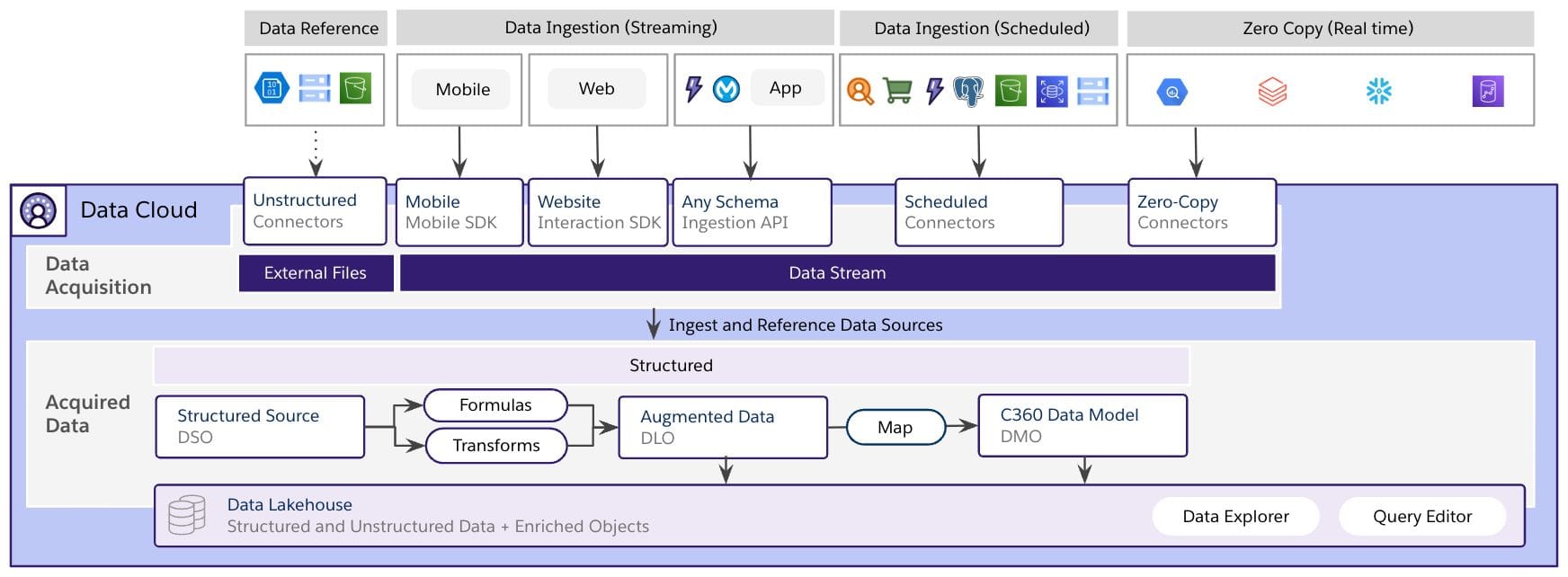
Salesforce’s power stems from its underlying AI and data architecture that operates as the platform’s “central nervous system.”
Unlike CRMs that bolt on AI as an afterthought, Salesforce embeds AI natively within the Einstein 1 Platform, providing deep contextual understanding and predictive analytics across all modules.
The Einstein 1 Platform: Salesforce’s Native AI Layer
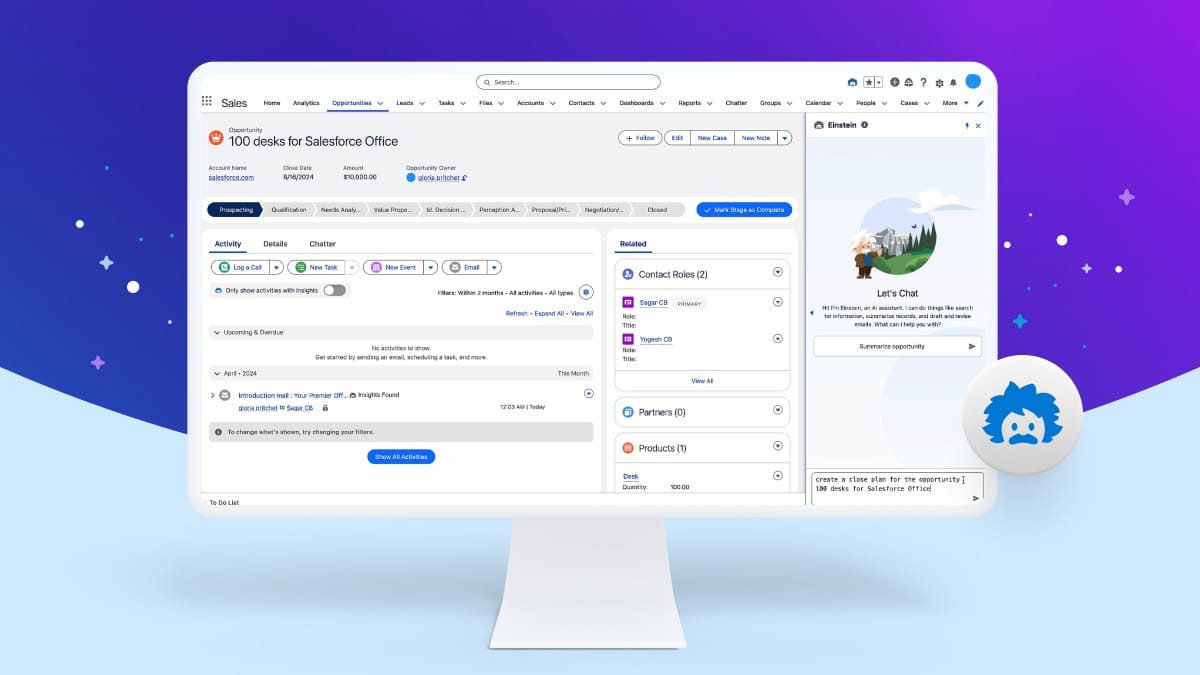
The Einstein 1 Platform integrates AI seamlessly into every Salesforce application, enabling:
- Predictive Lead Scoring: Uses machine learning to prioritize leads based on their likelihood to convert.
- Opportunity Insights: Flags deals at risk or likely to close soon.
- Case Classification: Automatically categorizes service cases for faster routing.
- Einstein Bots: Provide automated chat assistance to customers.
- Autonomous AI Agents: Salesforce is developing frameworks under Einstein 1 to build autonomous AI agents that can handle complex workflows and communications across sales, service, and marketing. These agents extend the existing “Einstein Copilot” capabilities by enabling higher degrees of automation and contextual action.
For example, Einstein analyzes historical sales data to identify the highest potential leads, helping sales teams focus efforts where they have the highest return.
Data Cloud: Creating a Single Source of Truth
The Data Cloud is Salesforce’s hyperscale data engine designed to integrate and harmonize customer data from disparate sources like ERP systems, data warehouses, or mobile apps.
It enables brand-new levels of real-time customer insight and activation.
Key 2025 features include:
- Zero-Copy Data Federation: Allows Data Cloud to access external data warehouses (e.g., Snowflake, BigQuery) without physically copying the data. This ensures that queries run against live data while reducing storage costs and complying with data residency requirements.
- Private Connect: Establishes a secure, private network tunnel between Salesforce and external clouds such as AWS or Azure, ensuring data does not traverse the public internet and reducing security risks.
Together, these innovations make Salesforce a true single source of customer truth, critical for AI-powered CRM success.
In-Depth Feature Documentation: Exploring the Salesforce Clouds
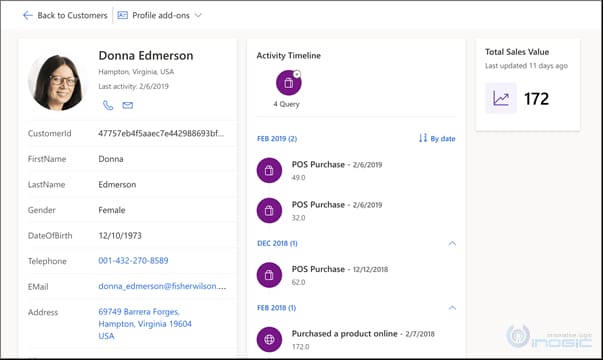
Salesforce organizes its offerings into specialized “Clouds” that address different business functions while running on the same unified platform.
Sales Cloud: Automating the Sales Process
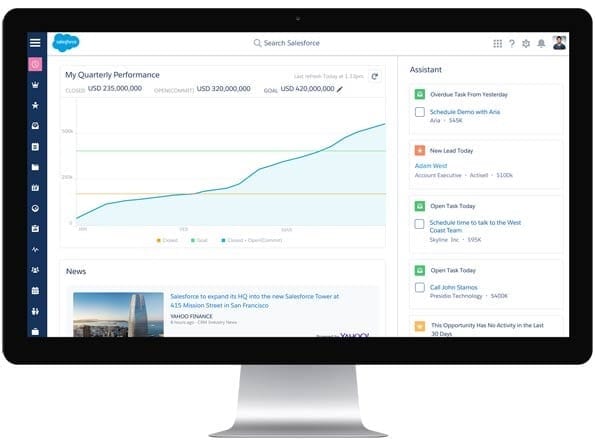
Lead, Contact, and Opportunity Management
What it is: Core CRM objects for managing potential customers (Leads), key contacts, and sales opportunities.
Capabilities:
- Log emails, calls, and meetings directly within customer records.
- Unified interaction timelines for full customer context.
- Pipeline visualization and deal tracking.
Sales Forecasting and Pipeline Management
What it is: Tools for sales leaders to predict revenues and configure sales targets.
Capabilities:
- Visual pipelines with drag-and-drop stage updates.
- Real-time dashboards showing forecast accuracy and team performance.
- Customizable quotas and forecast adjustments.
2025 AI Features in Sales Cloud
What they are: AI functionalities integrated directly within sales workflows.
Capabilities:
- Retrieval-Augmented Generation (RAG) helps draft personalized follow-up emails based on customer history.
- AI pipeline management flags deals likely to stall or slip.
Service Cloud: Powering Customer Service and Support
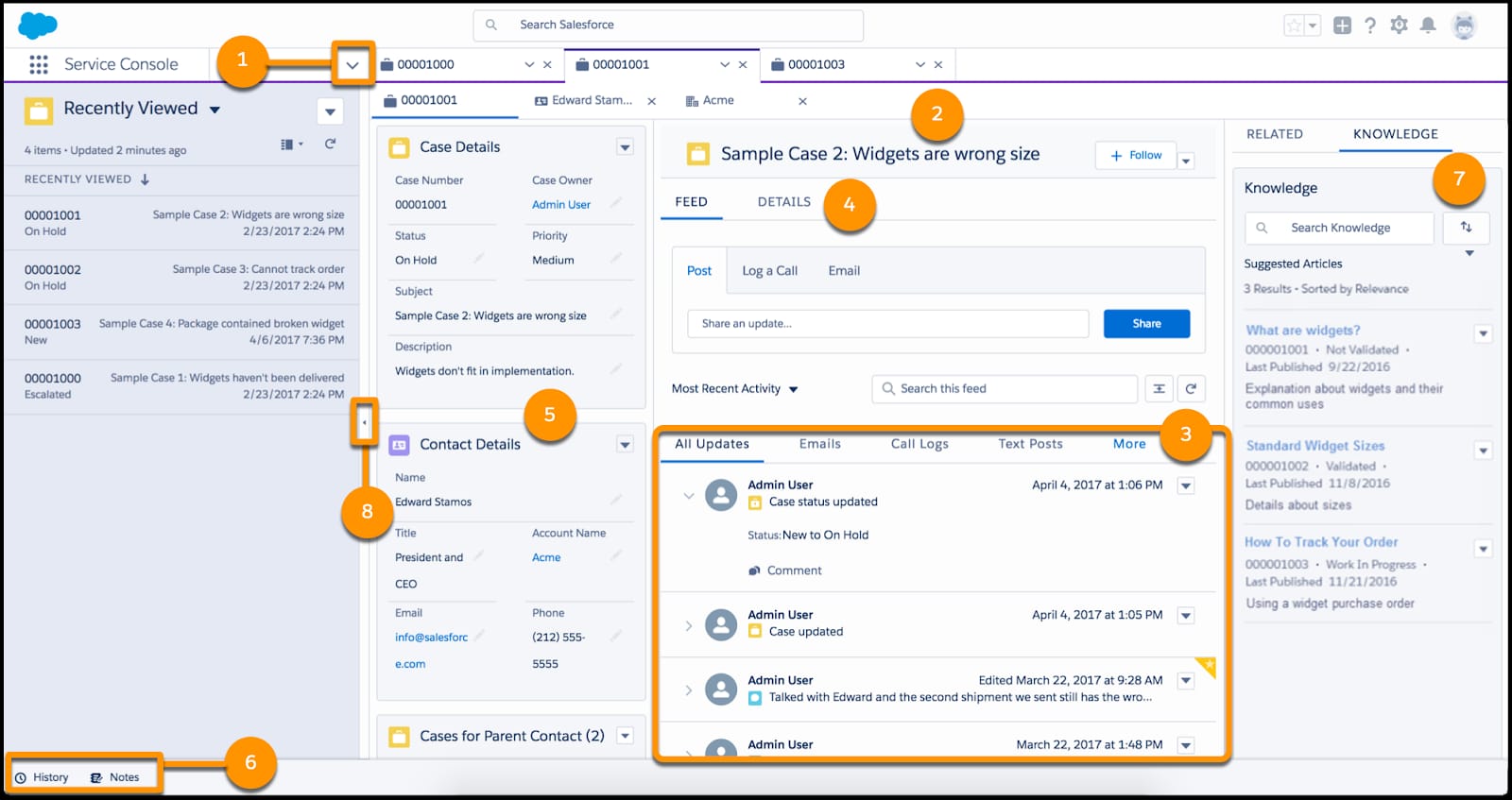
Case Management and Service Console
What it is: Central workspace for tracking and resolving customer issues, or “cases.”
Capabilities:
- Omni-channel routing consolidates support requests from phone, email, chat, and social media.
- Integration with knowledge bases helps agents find answers quickly.
- SLA tracking to ensure timely resolutions.
Multi-Channel Support
What it is: Manage support conversations across phone, email, social, and web chat.
Capabilities:
- CTI integration for telephony within the console.
- Email-to-Case and Social Studio support enable seamless customer engagement.
- Einstein Bots automate routine queries and ticket creation.
2025 AI Features in Service Cloud
What they are: AI tools to increase agent productivity and automation.
Capabilities:
- Service Assistant generates action plans automatically based on case details.
- Autonomous AI agents handle scheduling and dispatch for field service operations, leveraging Einstein 1’s new agentic framework.
Marketing Cloud: Managing the Customer Journey
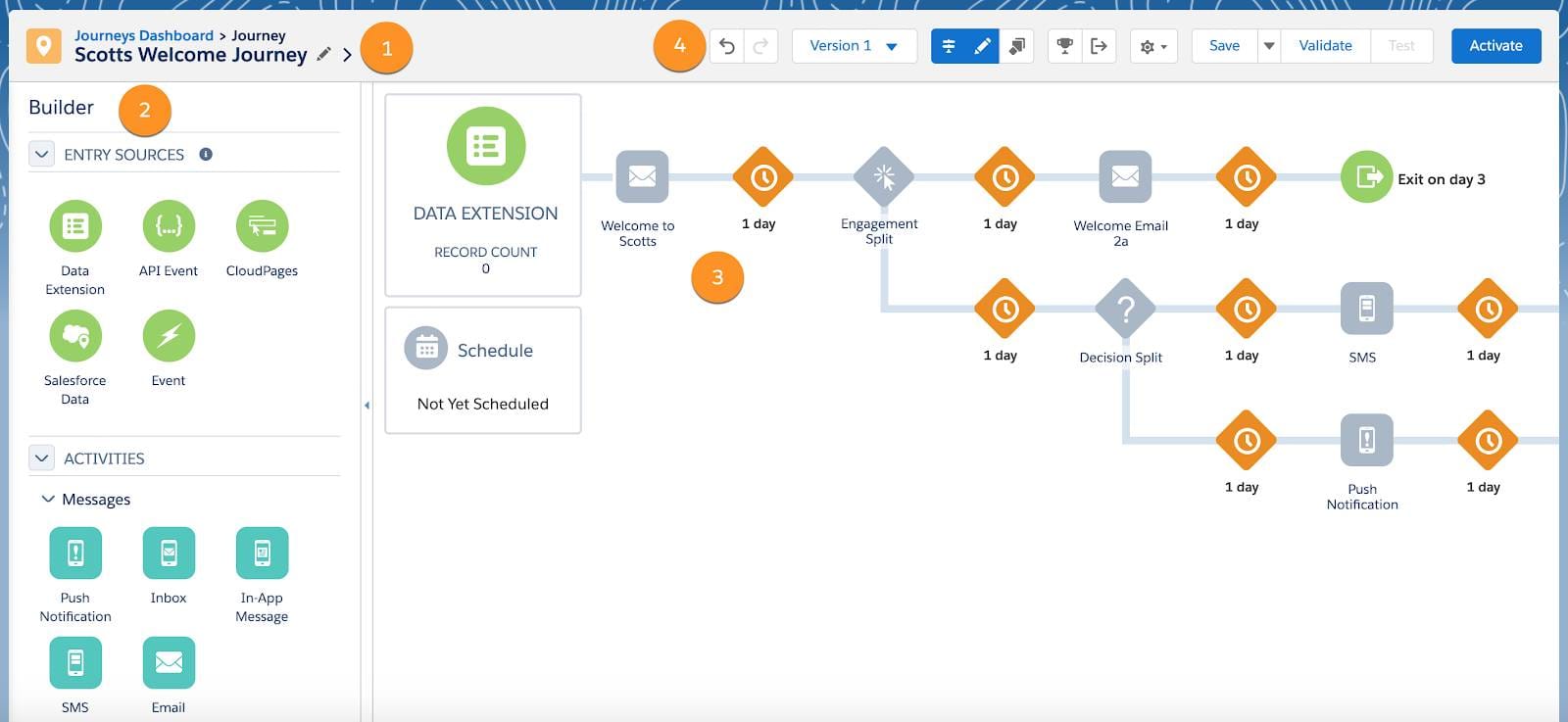
Journey Builder
What it is: Visual workflow designer for creating automated multi-channel campaigns.
Capabilities:
- Trigger campaigns based on customer behavior signals, such as abandoned shopping carts.
- Segment audiences and personalize messages across email, SMS, and advertising channels.
Email Studio and Social Studio
What they are: Tools for email marketing and social media management.
Capabilities:
- Drag-and-drop email creation with A/B testing features.
- Social media monitoring, listening, and publishing tools.
2025 AI Features in Marketing Cloud
What they are: Generative AI-powered content creation and expanded platform integrations.
Capabilities:
- AI-assisted drafting of email subject lines and body content using Einstein.
- Enhanced WhatsApp integration facilitates conversational marketing at scale.
For practical guidance on implementing these features, explore our comprehensive Salesforce Tutorials and Usecase collection.
Technical Specifications and System Requirements
Understanding technical requirements is critical to ensure Salesforce runs effectively within your IT environment.
Misalignment can lead to performance degradation, failed integrations, or costly delays.
Supported Platforms and System Requirements
| Category | Supported Versions |
|---|---|
| Web Browsers | Chrome, Firefox, Safari, Edge (latest stable versions) |
| Mobile OS | iOS 17.0 or later, Android 13.0 or later |
| Requirement | Recommended Specification |
|---|---|
| RAM | 8 GB (16 GB recommended for developers) |
| CPU | 2 GHz dual-core processor |
| Network | 1.5 Mbps bandwidth minimum, <150 ms latency |
Performance Metrics and Technical Limitations
- API Limits: Vary by edition. For example, Enterprise Edition allows over 100,000 API calls per 24 hours, but effective capacity depends on usage patterns and concurrent calls.
- Storage Limits: Salesforce editions start with 10 GB of data storage plus per-user allocations (e.g., 20 MB per user). File storage begins at 10 GB plus 2 GB per user license. For example, an Enterprise org with 50 users receives 10 GB + (50 × 2 GB) = 110 GB total file storage. This tiered structure is vital for accurate capacity planning.
- Governor Limits: These rules cap resource usage (e.g., CPU time, SOQL queries) per transaction to protect platform stability. Think of them as traffic regulations on a superhighway—ensuring one resource-intensive process doesn’t slow down the system for everyone else. Proper architectural planning by certified Salesforce developers is essential for staying within these limits.
Important: Miscalculating technical specs or ignoring governor limits can cause system performance issues, impacting uptime and user productivity. We strongly recommend engaging Salesforce architects or certified consultants to evaluate your environment before deployment.
Security, Compliance, and Data Governance
Security is a foundational pillar of Salesforce’s platform, particularly important for AI CRM Software where sensitive customer data is processed and analyzed.
The Einstein Trust Layer
Salesforce’s mandatory security framework for AI interactions includes:
- Secure Data Retrieval: AI requests are grounded strictly in your data, never allowing raw data to be exposed externally to language models.
- Data Masking: Automatically removes or anonymizes personally identifiable information (PII) before sending data to AI models.
- Zero-Data Retention: Salesforce contracts bind third-party AI providers from retaining any of your customer data, reducing privacy risk.
- Toxicity Detection & Audit Trails: Continuously monitors AI prompts and responses for harmful content with detailed logs for compliance and review.
Compliance Certifications and Data Protection
Salesforce maintains industry-leading compliance certifications essential for regulated industries:
- SOC 2 Type II: Demonstrates ongoing independent audits verifying effective security controls.
- ISO 27001: Confirms a comprehensive information security management system (ISMS).
- GDPR: Supports compliance with European data privacy regulations, including data subject rights and breach notification.
- HIPAA: Enables healthcare organizations to use Salesforce for Protected Health Information (PHI) handling. However, organizations must execute a Business Associate Agreement (BAA) with Salesforce and validate their own compliance configurations.
- Data Encryption: Encryption is applied both at rest and in transit using industry best practices.
- User Permissions & Roles: Fine-grained access controls allow admins to restrict data visibility and actions based on roles, ensuring least privilege principles.
Professional Note: Meeting compliance requirements is a shared responsibility. We strongly advise businesses in regulated sectors to engage legal and compliance experts to implement Salesforce correctly, review configurations, and ensure contractual protections (e.g., Data Processing Addendum for GDPR, BAA for HIPAA) are in place.
Salesforce Pricing and Editions (2025)
Salesforce pricing is structured on a per-user, per-month basis, billed annually.
It is crucial to understand that the prices below apply to individual Sales Cloud or Service Cloud editions, not combined bundles.
| Feature | Essentials ($25) | Professional ($80) | Enterprise ($165) | Unlimited ($330) |
|---|---|---|---|---|
| User Limit | Up to 10 users | Unlimited | Unlimited | Unlimited |
| Core CRM Features | Basic CRM | Complete CRM | Complete CRM | Complete CRM |
| Workflow Automation | Limited | Yes | Advanced | Advanced |
| API Access | No | Limited | Full | Full |
| 24/7 Support | No | No | Optional* | Yes |
*24/7 support is not included in the Enterprise edition’s base price but can be purchased additionally via Premier or Signature Success Plans. The Unlimited edition includes 24/7 Premier Support as part of its package.
Important:
- Pricing for combined Sales and Service Cloud bundles differs and is generally higher than the individual cloud prices listed here. Always verify bundle pricing directly with Salesforce or your implementation partner.
- Additional costs may include implementation services, third-party app subscriptions, user training, and administrative staff like Salesforce Administrators and developers.
Professional Consultation Recommendation:
Selecting the right Salesforce edition is a complex financial decision with significant impact on project success and ROI. Engaging a certified Salesforce implementation partner is highly recommended to assess your specific business needs, customize pricing strategies, and plan total cost of ownership (TCO) including licensing, support, and administration overhead.
Before making your final decision, it’s essential to compare Salesforce with other leading platforms. Review our detailed guide on Salesforce Top Alternatives and Competitors to ensure you’re choosing the best solution for your specific business requirements.
Integration Ecosystem: The AppExchange and APIs
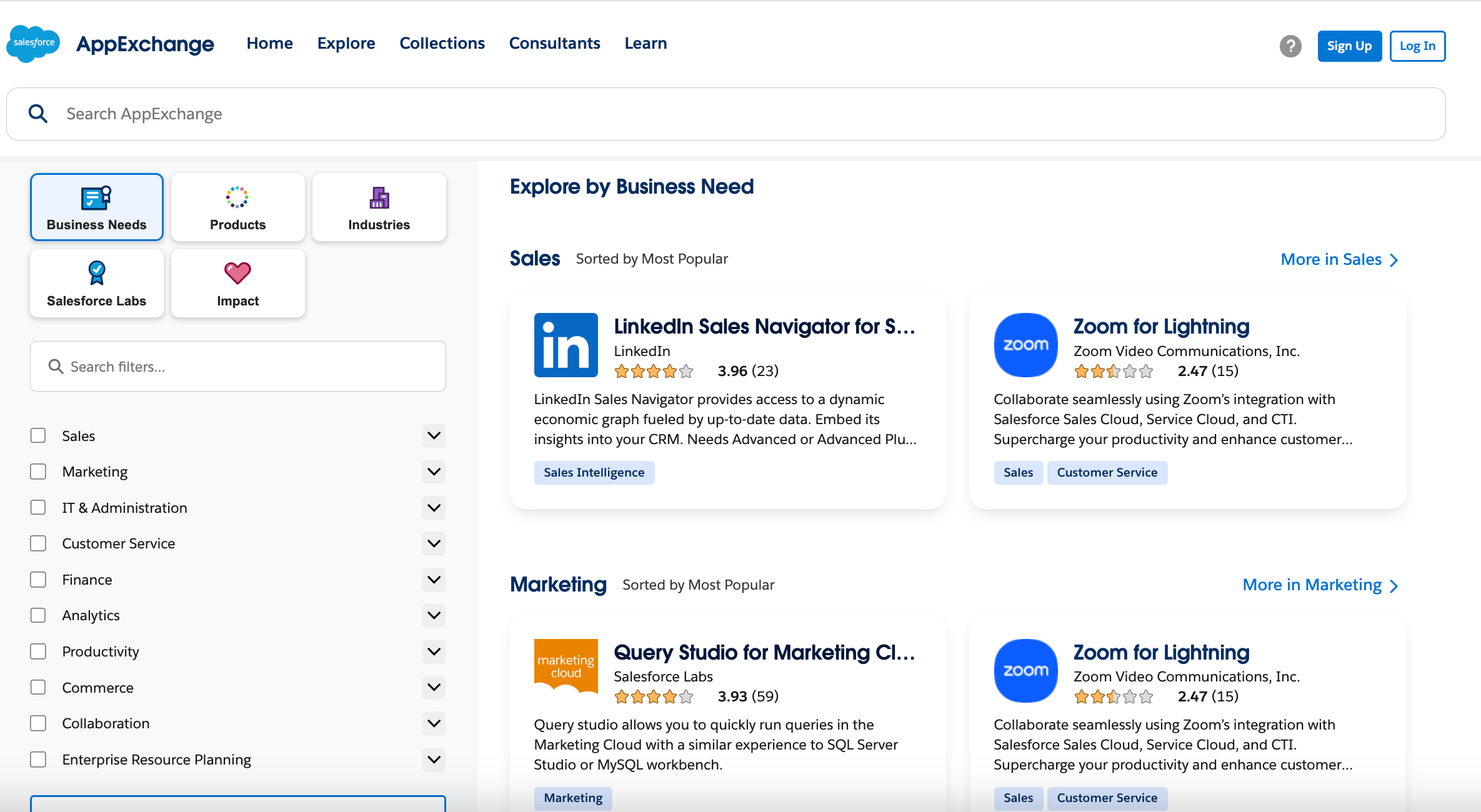
Salesforce’s rich integration ecosystem is a key differentiator, enabling the platform to serve as the central hub of your customer technology stack.
API Availability
A comprehensive suite of APIs enables flexible integration:
- REST API: Ideal for web and mobile app integrations.
- SOAP API: Used for system-to-system data exchange.
- Bulk API: Efficiently handles large data loads and exports.
- GraphQL API: Permits querying complex, interconnected data with a single request, improving efficiency.
The AppExchange Marketplace
Salesforce’s AppExchange is a vast enterprise cloud marketplace offering thousands of third-party apps and components that install natively:
- Apps range from document signing (DocuSign) to analytics (Tableau), project management, marketing automation, and more.
- Integration platforms like MuleSoft Anypoint enable deep API-led connectivity with ERPs, databases, and other enterprise systems.
- Low-code/no-code connectors like Zapier and Make allow users to automate workflows without heavy IT involvement.
Example: A sales team might install a DocuSign app to send contracts for electronic signature directly from Salesforce, automating contract workflows and accelerating closing cycles.
What Are the Primary Use Cases of Salesforce?
- Unified Sales and Service: Sales teams work in Sales Cloud to close deals, then service agents access complete customer histories in Service Cloud to provide personalized support.
- Automated Lead Nurturing: Website form submissions create leads automatically scored by Einstein and entered into Marketing Cloud journeys for customized outreach.
- Custom Business Applications: Companies build tailored apps on the Salesforce Platform to manage inventory, suppliers, or compliance workflows seamlessly integrated with sales and service data.
Getting Started with Salesforce: A First-Steps Guide
Launching Salesforce successfully requires a methodical approach beyond just signing up for a trial.
- Sign Up for a 30-Day Free Trial: Begin without a credit card at salesforce.com, with sample data for learning.
- Initial Setup Configuration: Configure company settings, security policies, and user profiles. Avoid heavy customization early to reduce complexity.
- Import Your Data: Prepare and cleanse customer data in .csv format and use the Data Import Wizard or Data Loader tool. For complex migrations, engage an implementation partner.
- Follow a Guided Learning Path on Trailhead: Access Salesforce’s free interactive training platform. The “Get Started with Salesforce” trail is an excellent foundation with hands-on practice.
Professional Implementation & Adoption Advice:
For enterprise deployments, conduct a thorough business process review before customization. Engage certified Salesforce partners to assist with data migration, customization, and user training. Plan a change management strategy to drive user adoption and realize ROI.
Frequently Asked Questions (FAQ) About Salesforce
If you have additional questions about Salesforce, explore our comprehensive Salesforce FAQs page for more detailed answers to common queries.
1. Q: What is Salesforce primarily used for?
A: Salesforce is primarily a Customer Relationship Management (CRM) platform that helps companies manage customer interactions across sales, service, and marketing in one centralized system, providing a unified 360-degree customer view.
2. Q: Can Salesforce be used by small businesses?
A: Yes. Salesforce offers Essentials and Professional editions tailored for small and medium-sized businesses. The Essentials plan starts at $25 per user per month for teams up to 10 users.
3. Q: Is Salesforce a SaaS or PaaS?
A: Both. Salesforce provides ready-to-use SaaS applications like Sales Cloud and Service Cloud. It also offers a PaaS layer—Einstein 1 Platform—for developers to build custom apps and AI workflows.
4. Q: What is Salesforce Einstein?
A: Salesforce Einstein is the platform’s built-in AI layer that delivers predictive analytics, lead scoring, opportunity insights, and automated recommendations to enhance user decisions.
5. Q: What is the Salesforce AppExchange?
A: The AppExchange is Salesforce’s online marketplace for third-party apps and components that extend core functionality without custom development.
6. Q: How much does Salesforce cost in 2025?
A: Pricing is per-user, per-month and varies by cloud and edition. Sales Cloud or Service Cloud editions start at $25 (Essentials), with Enterprise at $165 and Unlimited at $330 per user per month.
7. Q: What are governor limits in Salesforce?
A: Governor limits are platform-enforced caps on resource usage to maintain system stability in Salesforce’s multi-tenant environment, restricting operations like database queries per transaction.
8. Q: What is Salesforce Data Cloud?
A: Data Cloud is a real-time data platform that consolidates customer data from all sources into a single profile, enabling AI-driven insights and personalized customer experiences.
Disclaimer
Technology Evolution Notice:
Information in this article reflects comprehensive analysis as of 2025. Given the rapid evolution of AI CRM technologies, features, pricing, and compliance requirements may change. Consult official Salesforce resources for the most current information.
Professional Consultation Recommendation:
Salesforce implementations can have profound professional, financial, and compliance impacts. We strongly recommend engaging qualified Salesforce specialists or certified implementation partners to assess specific business needs and risks before committing.
Testing Methodology Transparency:
Our analysis is based on extensive hands-on testing, official documentation, and industry best practices current as of publication. Outcomes may vary depending on implementation, use cases, and organizational context.


Leave a Reply