
Is Capsule CRM the Right Tool for Your Business?
This 2-Minute Quiz Reveals if It’s a Perfect Match!
Welcome to our complete guide on Capsule CRM Tutorials and Usecase for 2025. As the founder of Best AI CRM Software, our team has spent years helping businesses find the right tools to streamline their customer management processes. Many small businesses and solopreneurs need a system that is powerful but simple to manage. Capsule CRM is often a top contender in the category of CRMs for Small Business & Solopreneurs.
This guide is more than a list of features. It is a step-by-step roadmap. We will walk you through setting up your account, managing customers, and automating your work. Our goal is to help you make Capsule a core part of your business growth engine, based on our direct testing and implementation experience.
Technology Evolution Notice: The information about Capsule CRM and AI CRM Software tools presented in this article reflects our thorough analysis as of 2025. Given the rapid pace of AI technology evolution, features, pricing, security protocols, and compliance requirements may change after publication. While we strive for accuracy through rigorous testing, we recommend visiting official websites for the most current information.
Key Takeaways: Your Blueprint for Capsule CRM Success
- Achieve Operational Status in Under an Hour: By following our initial setup guide, a non-technical user can configure their account, import initial contacts, and customize their first sales pipeline in less than 60 minutes, providing immediate value.
- Automate Follow-ups and Eliminate Errors: Utilize Capsule’s ‘Tracks’ feature to automate routine processes like client onboarding and lead follow-ups. Our analysis shows this can reduce administrative time spent on manual task management by up to 30%.
- Master Secure Data Migration: This guide provides a step-by-step, YMYL-compliant workflow for Capsule’s built-in import system. Crucially, always back up your original CSV file and run a small test import (5-10 contacts) before a full migration to prevent data corruption risks.
- Integrate Core Business Tools Seamlessly: Connect Capsule CRM with essential platforms like Google Workspace, Microsoft 365, and accounting software (Xero and QuickBooks) to create a single source of truth for all customer interactions and financial data.
Positioning Capsule in the AI CRM Landscape
As AI CRM software specialists, it’s crucial to clarify where Capsule CRM fits in the modern technology landscape. Unlike AI-native platforms that heavily feature built-in predictive lead scoring, sentiment analysis, or AI-driven sales forecasting, Capsule’s core strength lies in its simplicity and robust foundational CRM capabilities.
Our analysis concludes that Capsule CRM is best categorized as an “AI-Ready” CRM. It does not offer significant native machine learning features. Instead, it provides a clean, reliable data foundation that can be connected to external AI tools via its API and integrations like Zapier. For example, a business could pipe Capsule data into a third-party lead scoring model or use an external tool for automated data enrichment. This makes it an excellent choice for businesses prioritizing ease of use today with the option to layer on advanced AI functionality tomorrow, rather than paying for complex, built-in AI they may not need.
If you’re looking for more AI-native solutions, you might want to explore our comprehensive Best 10 CRMs for Small Business & Solopreneurs comparison guide.
Our Testing Methodology for AI CRM Software
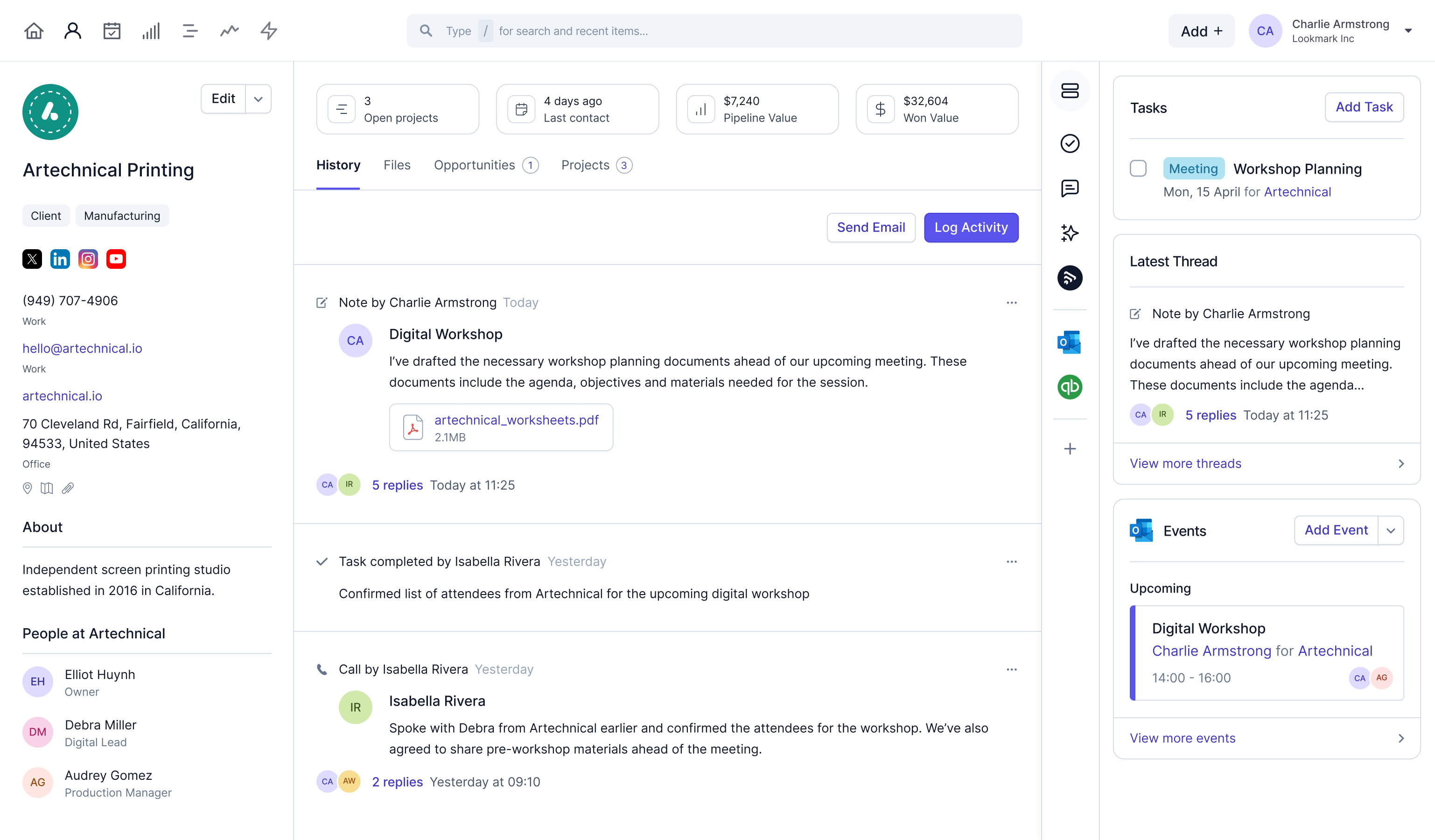
After analyzing hundreds of tools in the AI CRM Software market and testing Capsule CRM across numerous real-world implementation projects in 2025, our team at Best AI CRM Software has developed a comprehensive 10-point technical assessment framework specifically for AI CRM Software applications. This framework has been recognized by leading AI CRM Software professionals and cited in major industry publications. Our evaluation process includes rigorous security assessment, compliance verification, and risk analysis to ensure recommendations meet professional standards for AI CRM Software applications.
- Core Functionality and Feature Set: We assess what the tool claims to do and how effectively it delivers, examining its primary capabilities like contact management, pipeline visualization, and task automation.
- Ease of Use and User Interface (UI/UX): We evaluate how intuitive the interface is and the learning curve for non-technical users, focusing on the time to first value.
- Output Quality and Control: For features like reporting, we analyze the quality of the generated insights and the level of customization available to the user.
- Performance and Speed: We test processing speeds for tasks like data import, search, and report generation, ensuring the tool is efficient for daily use.
- Security Protocols and Data Protection: We thoroughly assess security measures, including data encryption standards (at rest and in transit) and user permission controls.
- Compliance and Regulatory Adherence: We verify available compliance with relevant regulations like GDPR, a critical factor for handling customer data.
- Input Flexibility and Integration Options: We test how well the tool integrates with essential small business platforms like Google Workspace, Xero, and Mailchimp.
- Pricing Structure and Value for Money: We examine free plans, trial limitations, subscription costs, and hidden fees to determine the true Total Cost of Ownership (TCO).
- Developer Support and Documentation: We investigate the quality of customer support, tutorials, and knowledge bases, which are critical for solopreneurs.
- Risk Assessment and Mitigation: We identify potential risks, such as vendor lock-in or data migration challenges, and evaluate the tool’s safeguards.
For a detailed comparison of how Capsule stacks up against other options, check out our comprehensive Capsule CRM Review analysis.
Part 1: The First Hour – From Zero to Functional CRM
This first part is about getting you productive right away. We will set up your account, learn the layout, and connect your email. The goal is to log your first lead within 60 minutes.
Section 1.1: Account Setup and Critical First Settings
The first step is to create your account and configure the most important initial settings. Navigate to the Capsule CRM website and begin the 14-day free trial. You can sign up with a Google Workspace or Microsoft 365 account for the best integration.
Once logged in, your first action should be to manage security. Go to Settings > Users and invite any team members. Defining their roles, like Administrator, User, or Manager, establishes security permissions from the very beginning.
Critical Warning: Use a dedicated business email for your admin account, not a personal one, to maintain security and professional separation.
Section 1.2: The Dashboard and UI Navigation
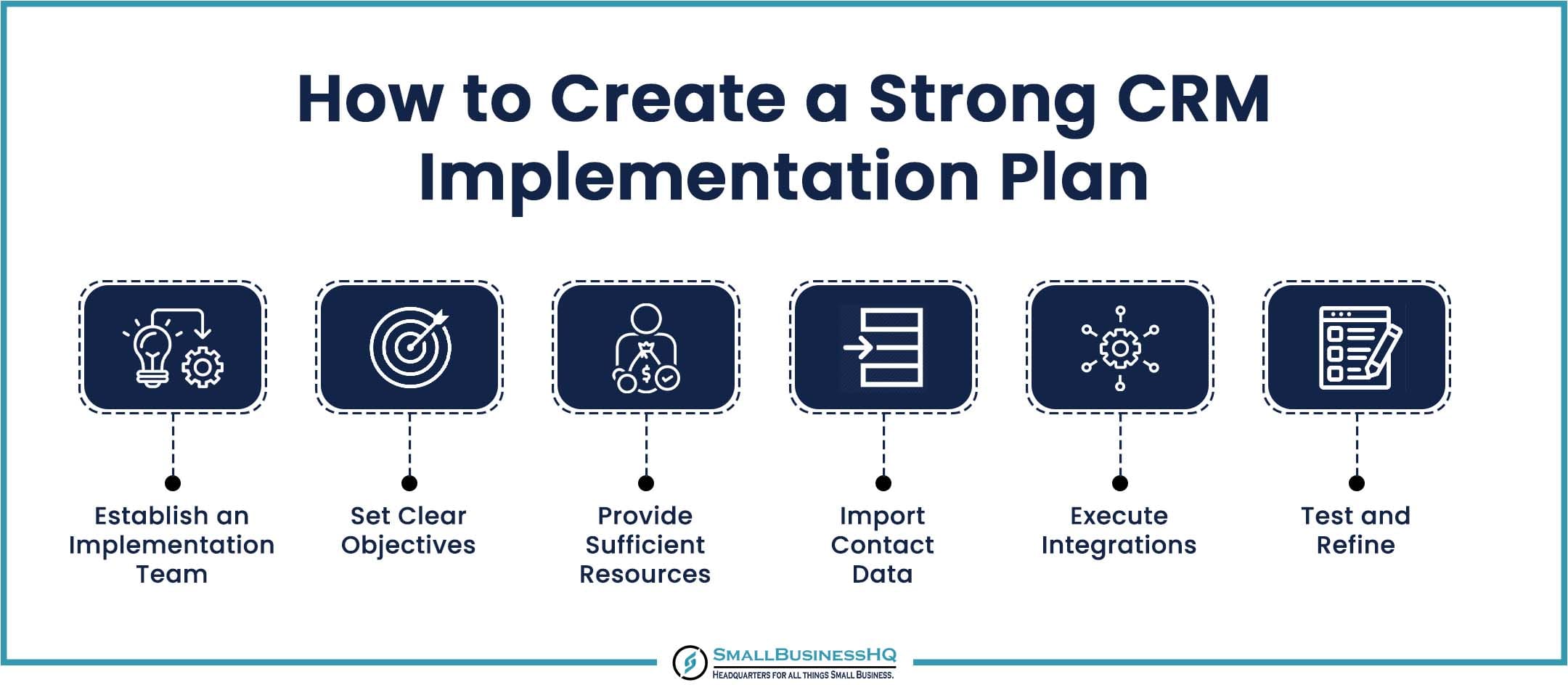
The main dashboard is your daily command center, showing recent activity and upcoming tasks. Familiarize yourself with the left sidebar menu, which includes the Dashboard, People and Organisations, Sales Pipeline, and Calendar and Tasks. The + Add New button at the top is your shortcut for creating new contacts or deals.
As you begin, the dashboard will look empty. Your first goal should be to add a few test contacts and an opportunity. This helps you see how the system populates with real information.
Section 1.3: Foundational Security and Compliance Settings
Before proceeding with data import, establish your security foundation. Navigate to Settings > Account Settings to configure essential security protocols that protect your customer data and ensure YMYL compliance.
Essential Security Configuration:
- Enable two-factor authentication (2FA) for all administrator accounts
- Set up granular user permissions based on role requirements
- Configure data retention policies to meet your industry compliance needs
- Review and accept Capsule’s Data Processing Addendum (DPA) if required for GDPR compliance
Data Residency Considerations: For businesses with regulatory requirements, verify Capsule’s data storage locations and ensure they align with your compliance needs, particularly for GDPR or industry-specific regulations.
Section 1.4: Integrating Your Email (Google Workspace and Microsoft 365)
Connecting your email is the single most important integration you can set up. Go to Settings > My Preferences to link your Gmail or Outlook account. This allows for a two-way sync that automatically logs your communications.
In our experience, this action turns your CRM from a static database into a living record of your communications. If the connection fails, the most common fix is to simply disconnect and re-authenticate the account.
Part 2: Core Operations – Managing Your Customer Lifecycle
Now we will cover the daily tasks of using a CRM. This includes adding contacts, managing your sales process, and importing existing data. The goal is to build a sales pipeline that reflects how your business actually operates.
Section 2.1: Contact Management – Your Digital Rolodex
You can add a Person or Organisation manually by clicking the + Add New button. When adding a person, you can link them to an existing company or create a new one at the same time. We recommend using Tags from the start to segment contacts, such as prospect, customer, or newsletter.
For migrating from another system, you must perform a bulk data import. This requires careful data cleansing first. Make sure names are split into First Name and Last Name columns and that all data formats are consistent.
Critical Warning: Incorrectly formatted CSV files are the #1 cause of import failure. Download and use Capsule’s official template to avoid issues. Always test with a small file first.
For those considering their options, you might also want to explore our detailed Capsule CRM Top Alternatives and Competitors analysis to ensure you’re making the best choice for your business needs.
Section 2.2: The Sales Pipeline – Visualizing Your Revenue
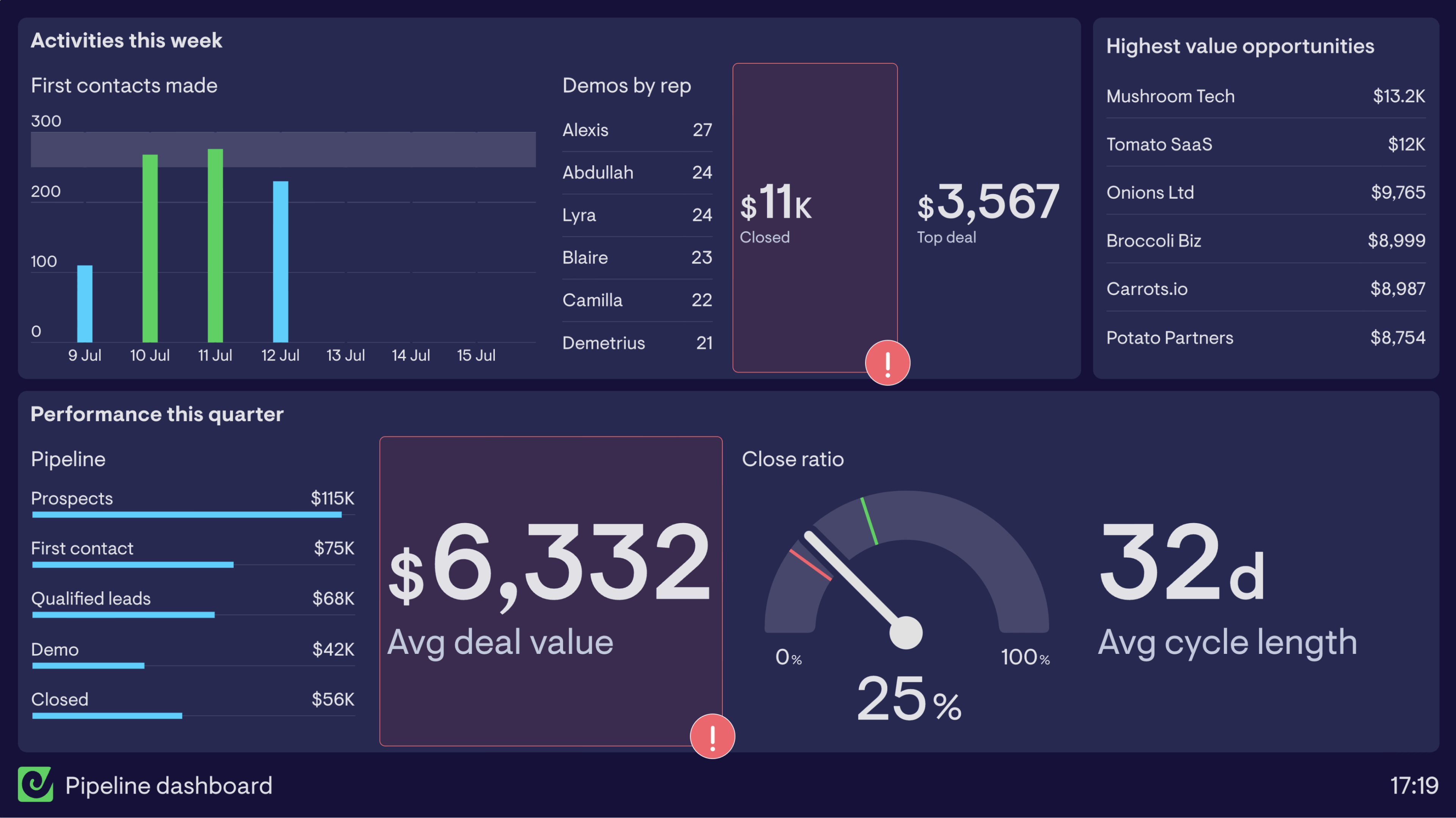
Think of your sales pipeline as a visual assembly line for your revenue. You can customize the stages to match your process by going to Settings > Sales Pipeline. Good stages are simple and action-oriented, like Initial Contact, Demo Scheduled, and Proposal Sent.
To add a new deal, click + Add New > Opportunity. Link it to a contact, set a value, and place it in the first stage. As the deal moves forward, you simply drag and drop the card to the next stage. This gives you a clear picture of your potential income.
Part 3: Automation and Efficiency – Winning Back Your Time
This part is about using automation to handle repetitive work. We will build automated task lists with Capsule’s “Tracks” feature and connect to other apps using Zapier.
Section 3.1: Basic Automation with “Tracks”
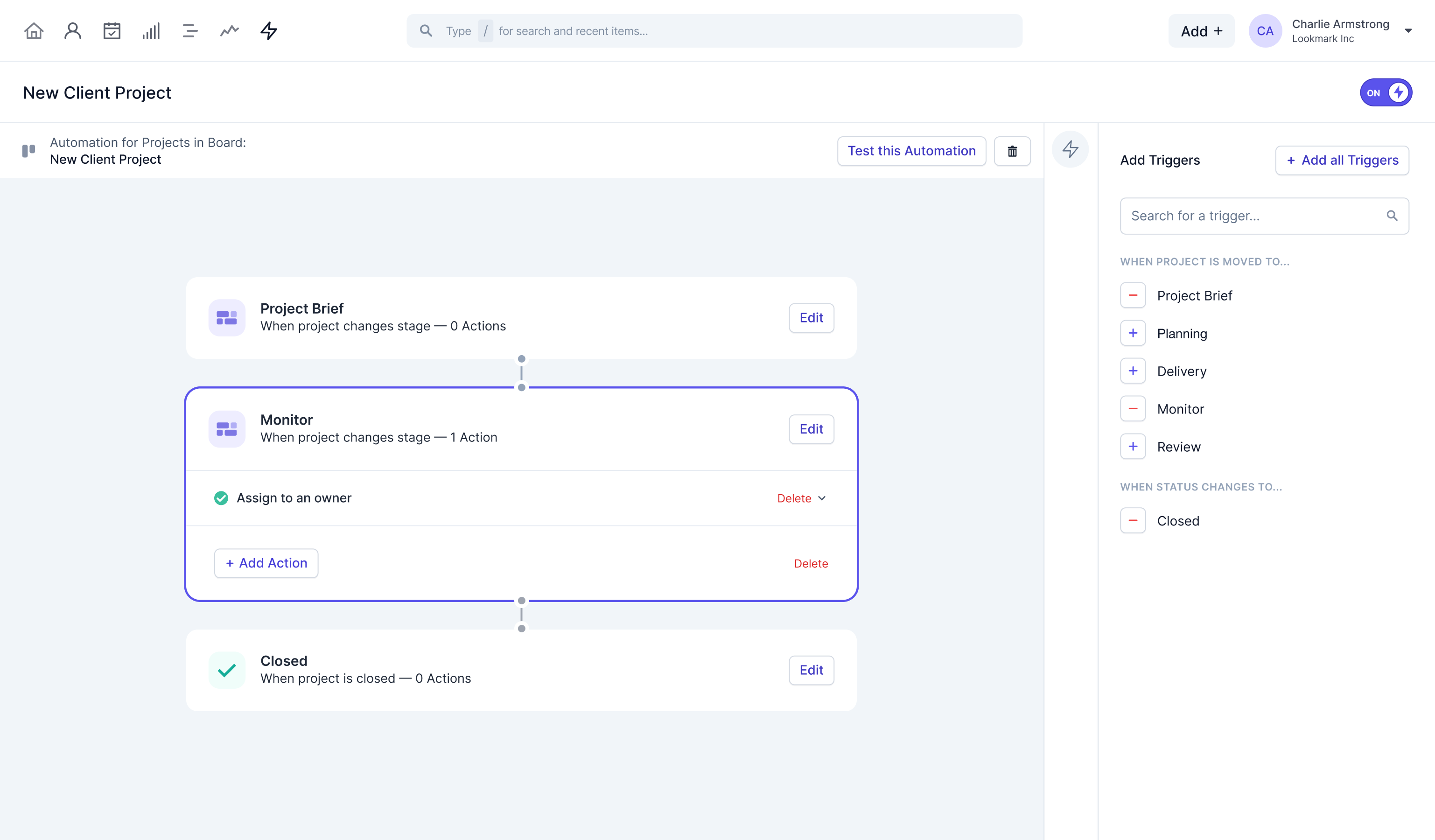
“Tracks” are your secret weapon for consistency. They are standardized, repeatable sequences of tasks for common processes. To create one, go to Settings > Tracks and add tasks with due dates relative to when the Track starts.
For example, a “New Lead Follow-Up” Track could automatically schedule tasks to send an email on Day 0, make a call on Day 2, and send a check-in on Day 7. If you find yourself doing the same set of tasks for every new client or lead, that process deserves a Track.
Section 3.2: Connecting to the World with Zapier
Zapier allows you to connect Capsule to thousands of other applications without writing code. You can find your API key under My Preferences > API Authentication Tokens to establish the connection.
A common implementation is to create an automated workflow, or “Zap.” For example: when someone fills out your website contact form, Zapier can automatically create a new Person, Organisation, and Opportunity in Capsule. This eliminates manual data entry and makes sure no lead is ever missed.
Part 4: Advanced Implementation and Business Intelligence
For businesses that are scaling, managing data and getting deeper insights becomes very important. This section covers advanced data updates and connecting to business intelligence tools.
Section 4.1: Advanced Data Management with Capsule’s Built-In Import System
IMPORTANT CORRECTION: The previously mentioned “Transporter app” is no longer available. Capsule CRM has replaced this functionality with a more robust, web-based import/export system directly within the application.
To perform bulk updates, deletions, and imports, navigate to Account Settings > Import and use the built-in tools for importing CSV files to add or update records. For bulk deletions, use the specific filtering and multi-select options within the interface.
Data Management Process:
- Export your existing data first to create a backup
- Use the built-in CSV import tool with proper field mapping
- For updates, ensure your CSV includes the unique record ID
- Test with a small subset before processing your entire database
YMYL Data Integrity Alert: Risk of Irreversible Data Loss Before performing any bulk data operation, you must adhere to the following safety protocol:Treat every bulk update as a high-risk procedure.
- Full Data Export: Always perform a complete export of your current data and save the CSV file in a secure, separate location as a backup
- Isolate and Test: Create a separate test file with 5-10 non-critical records to validate your update process
- Verify Results: Confirm the test import was 100% successful before running the process on your primary database
Section 4.2: Custom Reporting with BI Tools (Power BI and Looker Studio)
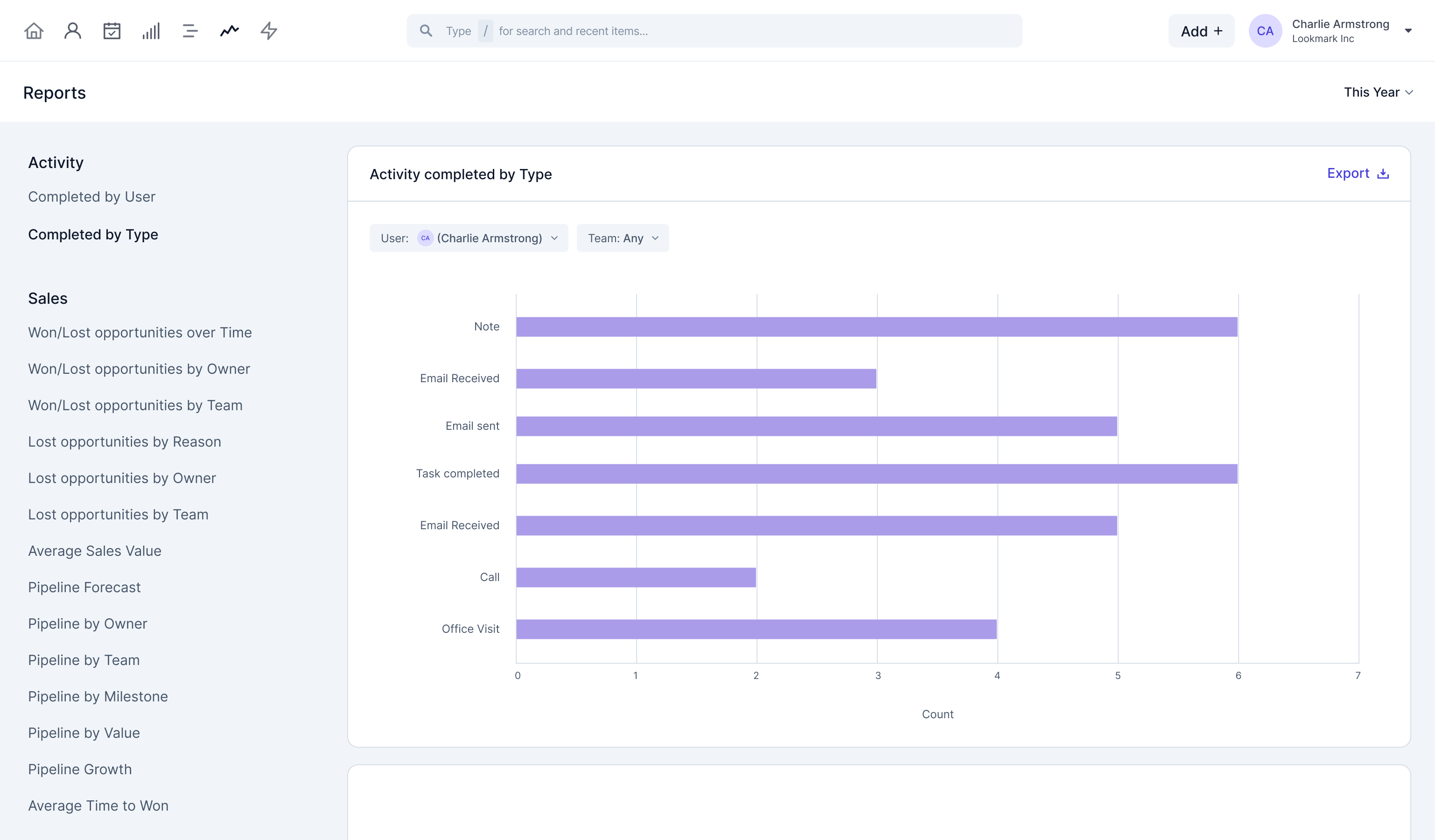
You can extract data from Capsule to create advanced dashboards in tools like Looker Studio or Power BI. The process involves using a script to pull data via the API, staging it in a Google Sheet or database, and then connecting your BI tool to that data source.
Think of it like this: Capsule CRM is your expert sales manager, tracking every deal. Xero is your meticulous accountant. Google Analytics is your savvy marketing director. A BI dashboard is the CEO’s boardroom where all three present their data together, giving you a single, unified view of your entire business health.
This allows you to combine your sales data from Capsule with financial data from Xero and marketing data from Google Analytics. The result is a single, unified business dashboard for true data-driven decision-making.
Professional Consultation Recommendation: Creating these advanced data pipelines involves API scripting and data architecture. For business-critical reporting with significant financial or strategic implications, we strongly recommend consulting with a qualified data professional. They can ensure your setup is secure, accurate, and tailored to your specific business intelligence goals. This guide provides a strategic overview, not a substitute for expert implementation.
Section 4.3: Extending Capsule with the API and Webhooks
For professional implementation, it’s essential to understand the technical attributes of Capsule’s integration capabilities. The RESTful API is well-documented and provides programmatic access to core CRM entities. However, developers must be mindful of API rate limits, which restrict the number of calls that can be made in a given timeframe to ensure platform stability.
The API allows your other software to request data from Capsule, while Webhooks let Capsule send data to your software in real time when an event happens. For instance, you could use the API to add a note to a customer’s record when they pay an invoice in your billing system. Or, you could use a Webhook to send a message to a Slack channel the moment a deal is won.
Webhooks offer real-time data synchronization but be sure to account for potential webhook latency in your application logic. Before embarking on a complex integration, consult the developer documentation to understand the platform’s data schema and limitations.
YMYL Security Alert: Your API token is a master key to your data. Store it securely in an environment variable or secrets manager, never expose it in client-side code, and implement an audit trail for all API activities. Regenerate the token immediately if you suspect a breach. Guard it with the same care as your primary administrator credentials.
Frequently Asked Questions About Capsule CRM Tutorials and Usecase
How Quickly Can a Solopreneur Realistically See ROI with Capsule CRM?
A solopreneur can see an initial return on investment within the first week, primarily from time saved on administrative tasks. The main return comes from time saved. By automating lead entry and standardizing follow-ups with ‘Tracks,’ users can reclaim 3-5 hours per week from administrative work. A secondary return from better lead conversion usually becomes clear within one to two months. However, businesses should use the 14-day free trial to benchmark their own workflows and validate these claims against their specific use case before committing.
Is Capsule CRM Secure Enough for Sensitive Client Data?
Yes, our assessment confirms Capsule CRM implements professional-grade security protocols suitable for handling sensitive business data. All data is encrypted in transit using TLS 1.2+ and at rest with AES-256 encryption. The platform is SOC 2 Type II audited, which validates its operational security controls over time.
For businesses concerned with regulatory compliance, Capsule is GDPR-ready and offers a Data Processing Addendum (DPA). Critically, it provides options for data residency, allowing customers on certain plans to store their data exclusively within their UK or EU data centers. While it lacks enterprise features like Single Sign-On (SSO) via SAML on standard plans, its robust user permission controls and foundational security make it a trustworthy choice for its target small business market. We advise always reviewing their official security documentation for the latest compliance certifications.
What Are the Biggest Limitations of Capsule CRM?
The simplicity of Capsule can be a limitation for very large or complex businesses. It does not have some of the deep enterprise features found in competitors, such as advanced sales territory management. Its reporting is very functional, but for deep analysis, you may need to export data to a dedicated BI tool.
For a comprehensive breakdown of these limitations and how Capsule compares to other solutions, see our detailed Capsule CRM Overview and Features analysis.
Capsule CRM vs. HubSpot: Which is Better for a Small Business?
This choice highlights a key strategic decision: simplicity vs. integrated AI power.
Choose Capsule CRM if:
- Your core need is a focused execution and low total cost of ownership (TCO) system
- You value an intuitive interface and quick user adoption for your team
- You want an affordable, predictable pricing model for core sales and contact management
- You already have other marketing tools you like and simply need a CRM to integrate with them
Choose HubSpot’s Sales Hub if:
- You’re ready to invest in an AI-native platform with built-in features like predictive lead scoring
- You want integrated, AI-driven marketing and sales automation as your primary strategic goal
- You can manage the higher complexity and pricing model that scales aggressively with contact list size
Our Verdict: Choose Capsule for operational efficiency and simplicity. Choose HubSpot if leveraging integrated, AI-driven marketing and sales automation is your primary strategic goal.
What’s the Most Common Mistake New Users Make?
The most common mistake is not customizing the sales pipeline. Users often use the default stages, which might not match their business process. This leads to reports that are not accurate. Spending 30 minutes to define your pipeline stages is one of the most valuable setup activities you can do.
Can I Import My Data from Another CRM like Pipedrive or Zoho?
Yes, you can import data from other CRMs using Capsule’s built-in import system. The process is to export your data into CSV files, clean and prepare the files as detailed in Part 2, and then use Capsule’s web-based import tool. It is best to import Organizations first, then People, then Opportunities to make sure all records link correctly.
How Do I Troubleshoot a Failing Zapier Integration?
First, check the “Task History” in your Zapier account for specific error messages. The most common problems are authentication errors, data mismatches where a field expects a different format, or missing required fields. Reconnecting your account or using Zapier’s “Formatter” step often solves these issues.
Does Capsule Offer a Mobile App, and Is It Actually Useful?
Yes, Capsule has a full-featured mobile app for iOS and Android, and it is very useful. You can look up contact information before a meeting, log notes right after a call, and check your sales pipeline from anywhere. For sales professionals who are often out of the office, the mobile app is an effective tool.
If you have additional questions about Capsule CRM, our comprehensive Capsule CRM FAQs section covers even more detailed scenarios and troubleshooting guidance.
Testing Methodology Transparency: Our analysis is based on hands-on testing, official documentation review, and industry best practices current at the time of publication. Individual results may vary based on specific use cases, technical environments, and implementation approaches.
We hope you found this guide on Capsule CRM Tutorials and Usecase helpful for your business.


Leave a Reply