
Is Capsule CRM the Right Choice for Your Business?
This 2-Minute Quiz Reveals the Answer!
Navigating the world of Capsule CRM FAQs is essential for small businesses and solopreneurs seeking efficient customer relationship management without overwhelming complexity. This comprehensive guide from Best AI CRM Software cuts through the marketing hype, providing objective answers to your most pressing questions about this popular category of CRMs for Small Business & Solopreneurs.
You’ll discover Capsule CRM’s core functionality, understand its unique position in the market compared to advanced AI CRM platforms, and learn about its scalability and integration capabilities. We’ll dive into its free version, compare it with major competitors like HubSpot, and clarify its approach to data security and GDPR compliance.
As an experienced business technology advisor, I’ve seen firsthand how crucial it is for professional decision-makers to choose the right CRM solutions to automate sales and improve customer relationships. Our mission at Best AI CRM Software is to empower you with data-driven insights.
Key Takeaways
- Simple CRM Solution: Capsule CRM prioritizes user-friendly design and core functionality over complex enterprise features, making it ideal for small businesses and solopreneurs.
- Genuine Free Plan: Unlike many competitors, Capsule offers a truly functional free version supporting 2 users and 250 contacts with real business value.
- No Native AI Features: Capsule focuses on CRM fundamentals rather than AI-powered analytics, but integrates with third-party AI tools for enhanced capabilities.
- GDPR Compliant & Secure: Comprehensive data protection measures including TLS encryption, AWS hosting, and built-in GDPR compliance tools for business safety.
- Quick Implementation: Most users achieve productivity within hours rather than weeks, with streamlined data import and intuitive interface design.
Let’s dive into this comprehensive Capsule CRM Overview and Features analysis to help you make an informed decision for your business growth.
What exactly is Capsule CRM, and who is it designed for?

Capsule CRM is a cloud-based Customer Relationship Management system specifically engineered for small and medium-sized businesses, solopreneurs, and sales teams who prioritize simplicity and effectiveness over complex enterprise features. Unlike AI-powered CRM platforms that focus on predictive analytics and machine learning, Capsule CRM excels at providing a clean, intuitive foundation for managing customer relationships without overwhelming users with advanced automation.
The platform serves as a centralized hub for all customer-related activities, including contact management, sales pipeline tracking, task organization, and communication history. Its core strength lies in its straightforward approach to CRM fundamentals – storing comprehensive contact information, visualizing sales opportunities through customizable pipeline stages, and maintaining detailed records of all customer interactions.
Capsule CRM is particularly well-suited for consultants, agencies, service-based businesses, and growing companies that find enterprise platforms like Salesforce too complex or expensive. The system’s design philosophy centers on immediate usability – new users can become productive within hours rather than weeks. This makes it an ideal choice for businesses that need reliable CRM functionality without dedicating extensive resources to training and implementation.
For companies seeking AI-enhanced capabilities, Capsule CRM integrates seamlessly with third-party AI tools through platforms like Zapier, allowing users to add specific automation and intelligence features as needed while maintaining the core system’s simplicity.
Does Capsule CRM have a free version, and what are its main limitations?
Yes, Capsule CRM offers a genuinely functional free plan that provides real value for freelancers, solopreneurs, and very small businesses beginning their CRM journey. Unlike many “freemium” models that serve merely as extended trials, Capsule’s free tier includes core CRM functionalities that can support actual business operations for an extended period.
The free plan accommodates up to 2 users and allows management of up to 250 contacts, making it suitable for small teams or partnerships. Users can create and track deals through a single sales pipeline, manage tasks and activities, and maintain comprehensive communication histories with their contacts. Basic email integration and mobile app access are also included.
However, several strategic limitations are designed to encourage upgrades as businesses grow:
- Contact Ceiling: The 250-contact limit becomes restrictive for businesses with expanding customer bases or extensive prospect lists
- Single Pipeline Restriction: Businesses offering multiple products or services cannot create separate, customized sales processes
- Limited Integration Access: Premium integrations with tools like Mailchimp, Xero, QuickBooks, and advanced Google Workspace features require paid plans
- No Advanced Reporting: Sales forecasting, team performance analytics, and detailed activity reports are unavailable
- Basic Support Only: While email support is provided, priority assistance and dedicated onboarding are reserved for paid tiers
The free plan serves as an excellent testing ground for CRM adoption, but most growing businesses find they need to upgrade when they hire additional team members, exceed the contact limit, or require specific integrations with their existing business tools. For a deeper understanding of how Capsule compares to other options, explore our detailed Capsule CRM Review.
How does Capsule CRM compare to a major competitor like HubSpot?
The comparison between Capsule CRM and HubSpot represents a fundamental choice between focused simplicity and comprehensive platform breadth. Each serves different business philosophies and operational needs within the CRM landscape.
Capsule CRM’s Focused Approach:
Capsule excels in providing streamlined CRM functionality without feature bloat. Its interface prioritizes ease of use, enabling new users to achieve productivity within a single afternoon. The pricing structure remains transparent and affordable as teams scale, with fewer complex tiers and hidden costs. For businesses primarily focused on sales relationship management, Capsule delivers essential contact management, deal tracking, and task organization without unnecessary complexity.
HubSpot’s All-in-One Strategy:
HubSpot positions itself as a complete business growth platform, integrating sales, marketing, and customer service under one comprehensive system. It offers sophisticated marketing automation, email campaigns, landing page builders, blogging platforms, and customer service hubs. The paid tiers include native AI features like predictive lead scoring, automated content optimization, and intelligent workflow automation.
Critical Decision Factors:
Choose Capsule CRM when your primary need is efficient sales relationship management and you already have preferred solutions for marketing, accounting, or customer service. It’s ideal for teams valuing operational speed and simplicity over feature breadth.
Choose HubSpot when you need an integrated ecosystem for marketing, sales, and service activities, and you’re prepared to invest in training and potentially hiring specialists to maximize the platform’s extensive capabilities.
The total cost of ownership often favors Capsule for smaller teams, as HubSpot’s complexity frequently requires dedicated administrative resources or external consultants to fully leverage its capabilities. To explore more options, check out our comprehensive guide to the Best 10 CRMs for Small Business & Solopreneurs.
Does Capsule CRM have native AI features for sales forecasting or lead scoring?
No, Capsule CRM does not include native artificial intelligence features such as predictive sales forecasting, automated lead scoring, or machine learning-driven insights. This represents a deliberate design philosophy rather than a technical limitation, positioning Capsule as a premium foundation CRM rather than an AI-powered platform.
Capsule’s approach prioritizes core CRM mastery over AI complexity. The platform focuses on delivering exceptional contact management, pipeline visualization, and relationship tracking without the data intensity and complexity that native AI features typically require. This philosophy keeps the system accessible, affordable, and immediately productive for small businesses without dedicated technical resources.
However, this doesn’t eliminate AI possibilities for Capsule CRM users. The platform’s robust integration capabilities enable connection with specialized AI tools through automation platforms like Zapier, Make, or direct API integrations. Users can implement AI-driven workflows such as:
AI-Enhanced Lead Scoring: Connect lead capture forms to AI analysis tools that evaluate prospect data and automatically populate custom scoring fields in Capsule based on company size, industry, or behavioral indicators.
Intelligent Data Enrichment: Set up automated workflows where new Capsule contacts trigger AI-powered research tools to gather additional company information, social profiles, and relevant business intelligence.
Predictive Analytics Integration: Connect Capsule data to external AI platforms for sales forecasting and trend analysis, then import insights back into custom fields or reports.
This modular approach allows businesses to add specific AI capabilities as needed while maintaining Capsule’s core simplicity, avoiding the complexity and cost associated with all-in-one AI CRM platforms.
What are the top 3 alternatives to Capsule CRM?

When evaluating Capsule CRM alternatives, businesses typically seek similar priorities: simplicity, strong contact management, and reasonable pricing. The leading alternatives each address these needs with different balances of features, complexity, and cost structures.
1. Zoho CRM
Zoho CRM stands as the most direct competitor, offering a more generous free plan supporting up to 3 users while providing extensive customization options. Zoho’s strength lies in its comprehensive business ecosystem integration, allowing seamless connection with accounting, email marketing, project management, and inventory systems. However, this breadth comes with interface complexity and a steeper learning curve. Zoho CRM suits businesses wanting a single ecosystem for multiple operations and willing to invest time in comprehensive setup and training.
2. HubSpot CRM
HubSpot CRM represents the “all-in-one” alternative with robust free offerings and integrated marketing, sales, and service hubs. Its free CRM provides unlimited contacts and users, serving as an entry point to powerful marketing automation and customer service tools. HubSpot excels when businesses prioritize inbound marketing integration and want unified sales-marketing data. The trade-off involves higher complexity and significantly higher costs when accessing advanced features across multiple hubs.
3. Pipedrive
Pipedrive focuses intensely on sales pipeline management with superior visual deal tracking and sales-specific reporting features. Its interface excels in pipeline clarity and ease of use for sales-focused teams. Pipedrive offers more granular sales forecasting and activity reporting than Capsule’s basic tiers. However, it typically costs more than Capsule and provides less comprehensive contact management features. Pipedrive suits teams living primarily in the sales pipeline who want tools built exclusively around deal progression workflows.
Each alternative involves trade-offs between simplicity, features, and cost that businesses must evaluate against their specific operational priorities and technical resources. For a detailed comparison, explore our guide to Capsule CRM Top Alternatives and Competitors.
How does Capsule CRM handle data security and GDPR compliance?
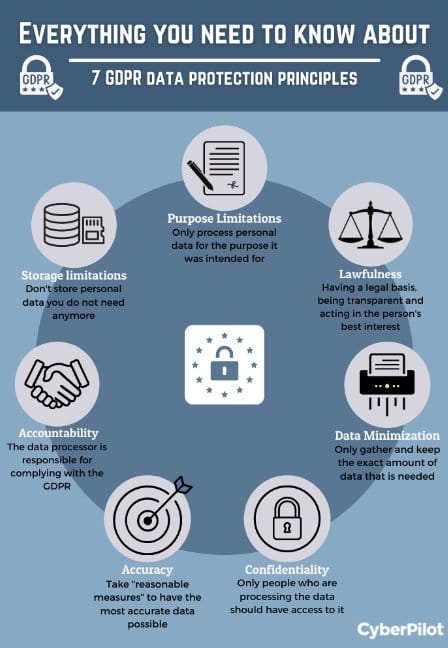
Capsule CRM implements comprehensive data security measures and GDPR compliance features essential for businesses managing sensitive customer information. The platform’s security architecture combines technical safeguards with regulatory compliance tools to protect customer data throughout storage and transmission.
Technical Security Infrastructure:
All data transmission between users and Capsule’s servers utilizes industry-standard TLS (Transport Layer Security) encryption, providing the same protection level used by financial institutions. Customer data is stored in secure Amazon Web Services (AWS) data centers, benefiting from enterprise-grade physical security, network isolation, and redundant backup systems. This infrastructure provides 99.9% uptime reliability with multiple geographic backup locations.
GDPR Compliance Features:
Capsule CRM provides specific tools and processes to help businesses meet General Data Protection Regulation requirements:
- Data Processing Agreements (DPA): Standard DPA documentation clearly defines Capsule’s responsibilities as a data processor
- Lawful Basis Tracking: Custom fields allow businesses to document and track the legal basis for processing each contact’s data
- Data Portability: Complete contact record exports enable compliance with “right to portability” requests
- Right to Erasure: Permanent deletion capabilities support “right to be forgotten” obligations
- Audit Trails: Activity logging tracks data access and modifications for compliance documentation
Advanced User Permissions:
Important Note: Granular user permission controls, including the ability to restrict data visibility and prevent unauthorized exports, are only available on Teams and Enterprise plans. The Free and Professional tiers do not include role-based access management features critical for businesses with multiple employees handling sensitive customer data.
Businesses handling regulated data should verify that their chosen subscription tier provides the specific access controls required for their compliance obligations.
What are the pricing tiers for Capsule CRM, and what’s the main reason to upgrade?
Capsule CRM offers a transparent, scalable pricing structure designed to grow with businesses without hidden fees or complex add-on costs. The pricing model focuses on user count and feature access rather than contact volume restrictions common with other CRM platforms.
Free Tier
Supports up to 2 users and 250 contacts, providing basic CRM functionality including deal tracking, task management, and essential integrations. This tier serves as an extended trial for small businesses testing CRM adoption.
Professional Tier
The most popular upgrade path, primarily chosen for expanded contact management (50,000 contacts), unlimited users, and premium integrations. Key integrations include Mailchimp for email marketing, comprehensive Google Workspace and Microsoft 365 connectivity, accounting software integration (Xero, QuickBooks), and advanced calendar syncing. This tier also unlocks activity reporting and basic sales analytics.
Teams Tier
Designed for growing sales organizations requiring advanced reporting and user management. Features include sales forecasting, team performance analytics, pipeline reporting, and crucially, granular user permissions and role-based access controls. This tier is essential for businesses needing to restrict data access, control export capabilities, and maintain compliance with data protection regulations.
Enterprise Tier
Provides dedicated support resources including a Customer Success Manager, custom onboarding programs, and priority technical support. This tier suits larger organizations requiring hands-on implementation assistance and ongoing strategic guidance.
Upgrade Triggers
Most businesses upgrade from Free to Professional when they exceed the 250-contact limit or need specific integrations with existing business tools. The subsequent move to Teams typically occurs when businesses hire sales managers who need team visibility and performance analytics, or when regulatory compliance requires granular user access controls.
How easy is it to import data and get started with Capsule CRM?
Capsule CRM is widely recognized for its streamlined onboarding process, making it one of the most accessible CRM platforms for non-technical users. The complete data import and initial setup typically requires just a few hours, allowing businesses to achieve immediate productivity without extended implementation periods.
Primary Import Methods:
The standard import process uses CSV (Comma-Separated Values) files, which can be exported from virtually any email client, spreadsheet application, or existing CRM system. Capsule’s import wizard guides users through each step:
- Data Preparation: Organize contact information in a spreadsheet with clear column headers (First Name, Last Name, Email, Company, Phone, etc.)
- File Upload: Navigate to Capsule’s import section and upload the prepared CSV file
- Field Mapping: Match spreadsheet columns to corresponding Capsule fields through an intuitive interface that auto-detects common field types
- Import Review: Preview the data before final import to ensure accuracy and completeness
- Import Execution: Complete the import process, which handles thousands of contacts within minutes
Direct Integration Imports:
For users already utilizing Google or Microsoft ecosystems, Capsule offers direct Gmail/Google Contacts and Outlook/Microsoft 365 contacts importers. These tools can sync existing contact databases with just a few clicks, eliminating manual file preparation.
Implementation Best Practices:
The platform’s clean interface and logical organization minimize training requirements. Most users become proficient within their first day, with advanced features easily discoverable through intuitive navigation. The combination of straightforward import tools and user-friendly design makes Capsule CRM particularly suitable for businesses seeking immediate CRM value without extensive technical implementation projects.
For step-by-step guidance on maximizing your Capsule CRM setup, check out our comprehensive Capsule CRM Tutorials and Usecase guide.
What kind of customer support and training resources are available?

Capsule CRM provides comprehensive support and training resources tailored to its small and medium business user base, emphasizing accessibility and practical guidance rather than enterprise-level complexity. The support structure balances self-service resources with human assistance to accommodate different learning preferences and urgency levels.
Support Channels:
All users, including those on the free plan, receive email support from Capsule’s UK and US-based support teams. User reviews consistently praise response times and the quality of assistance provided during standard business hours. While 24/7 live chat and phone support aren’t universally available across all tiers, the email support system effectively handles most user needs with detailed, personalized responses.
Self-Service Resources:
Capsule maintains an extensive knowledge base featuring step-by-step guides, best practices articles, and detailed feature documentation. Each topic includes screenshots and clear instructions, making it easy for users to find answers independently. The knowledge base covers everything from basic setup to advanced customization and integration configuration.
Video Learning Library:
A comprehensive collection of video tutorials provides visual guidance for key processes including pipeline setup, contact import procedures, integration configuration, and workflow optimization. These resources are particularly valuable for visual learners who prefer demonstration-based instruction.
Premium Support Services:
Enterprise plan subscribers receive dedicated support through assigned Customer Success Managers who provide personalized onboarding assistance, team training sessions, and ongoing strategic guidance. This hands-on approach ensures high adoption rates and optimal platform utilization for larger teams.
The support structure effectively serves Capsule’s target audience of small businesses that need reliable assistance without the complexity and cost associated with enterprise-level support programs.
Ready to explore Capsule CRM for your business? This guide has covered the essential questions most businesses have when evaluating CRM solutions. For additional insights and frequently asked questions, visit our dedicated Capsule CRM FAQs page where we continue to address emerging questions from the small business community.



Leave a Reply