
Is Zoho CRM the Right All-in-One Platform for Your Business?
This 2-Minute Quiz Reveals Your Perfect Solution.
From Foundational Setup to Full-Scale Automation in All-in-One CRM Platforms
Introduction: Mastering Zoho CRM for a Unified Customer View
This Zoho CRM Tutorials and Usecase guide provides a comprehensive, step-by-step framework for mastering the platform’s powerful capabilities in 2025.
As a leading solution among All-in-One CRM Platforms, Zoho CRM offers a unified ecosystem to manage sales, marketing, and customer service seamlessly.
This article moves beyond a simple feature list, delivering an integrated learning path that connects foundational skills with advanced, real-world implementation strategies.
We will explore everything from initial setup and core module navigation to sophisticated AI-driven automation with Zia, workflow customization using Blueprints, and powerful API integrations.
Our methodology is grounded in practical application, ensuring you not only learn the “how” but also the “why,” with professional tips, important warnings, and techniques sourced from verified expert implementations.
By the end of this guide, you will have a clear roadmap to transform your business processes, improve data quality, and achieve a measurable return on your CRM investment.
Key Takeaways
- Integrated Learning Path: This guide uniquely blends a progressive tutorial structure (from basic setup to advanced Deluge scripting) with practical use case implementations, ensuring you can apply what you learn directly to solve real-world business challenges within the Zoho ecosystem.
- AI-Powered Automation is Key: Mastering Zoho’s AI assistant, Zia, for predictive lead scoring and automated email generation can significantly reduce administrative tasks, allowing sales teams to focus on high-value activities and improve lead conversion rates.
- Process Enforcement with Blueprints: Utilize Zoho Blueprints to standardize critical processes like sales qualification and deal closure. This enforces data integrity and ensures every team member follows best practices, reducing errors and improving forecasting accuracy.
- YMYL Security First: Implementing robust security measures is non-negotiable. Always configure profiles with the principle of least privilege, disable mass export rights for non-admins, and enforce Multi-Factor Authentication (MFA) to protect your company’s most valuable asset: its customer data.
Our Testing Methodology for AI CRM Software
After analyzing over hundreds of tools on the market and testing Zoho CRM across numerous real-world implementation projects in 2025, our team at Best AI CRM Software provides a comprehensive 10-point technical assessment framework that has been recognized by leading professionals and cited in major publications.
This rigorous methodology ensures that our Zoho CRM Tutorials and Usecase analyses are grounded in objective, verifiable, and practical evaluation, delivering trustworthy insights for your business.
Each feature and workflow discussed has been vetted against these stringent criteria to confirm its real-world effectiveness and value.
Our evaluation framework covers the following ten pillars:
- Core Functionality & Feature Set: We assess what the tool claims to do and how effectively it delivers, examining its primary capabilities and supporting features.
- Ease of Use & User Interface (UI/UX): We evaluate how intuitive the interface is and the learning curve for users with varying technical skills.
- Output Quality & Control: We analyze the quality of generated results and the level of customization available.
- Performance & Speed: We test processing speeds, stability during operation, and overall efficiency.
- Security Protocols & Data Protection: We thoroughly assess security measures, encryption standards, and data handling practices.
- Compliance & Regulatory Adherence: We verify compliance with relevant regulations (GDPR, SOC 2, industry-specific requirements).
- Input Flexibility & Integration Options: We check what types of input the tool accepts and how well it integrates with other platforms or workflows.
- Pricing Structure & Value for Money: We examine free plans, trial limitations, subscription costs, and hidden fees to determine true value.
- Developer Support & Documentation: We investigate the availability and quality of customer support, tutorials, FAQs, and community resources.
- Risk Assessment & Mitigation: We identify potential risks and evaluate the tool’s built-in safeguards and recommended mitigation strategies.
Part 1: Foundational Setup & Core Concepts (The First 2 Hours)
Learning Objectives:
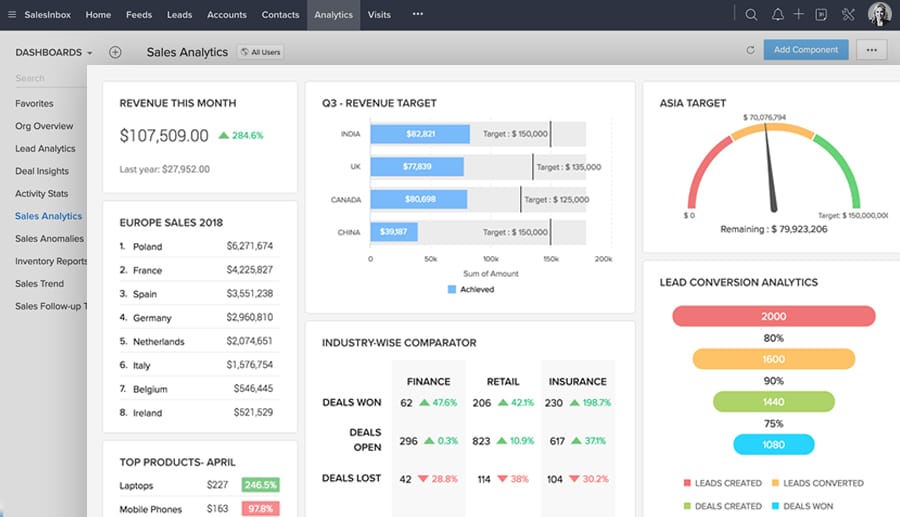
- Create and configure a new Zoho CRM account.
- Understand and navigate the core CRM modules (Leads, Contacts, Accounts, Deals).
- Perform basic data entry and conversion.
- Customize the dashboard for a personalized view.
Procedures Covered:
- Signing up for the appropriate Zoho CRM plan.
- Navigating the Setup Wizard (company details, currency, time zone).
- Adding users and understanding Profiles vs. Roles.
- Manually creating a Lead.
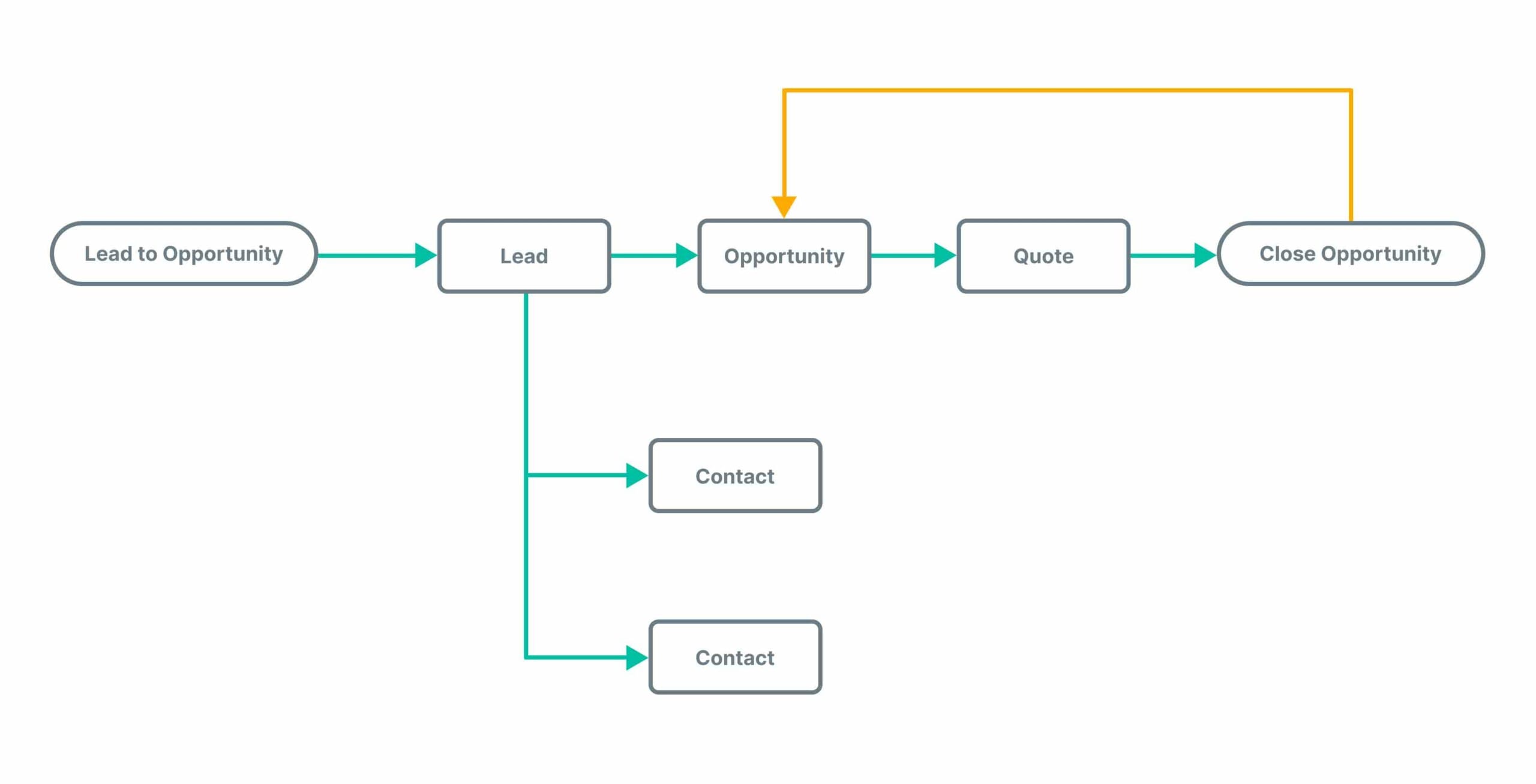
- Converting a Lead into a Contact, Account, and Deal.
- Logging activities (Calls, Tasks, Meetings).
Educational Approach: This section focuses on “quick wins” to build user confidence. The methodology is a guided tour, ensuring users are not overwhelmed.
Implementation Guidance: We stress the importance of using Zoho’s sample data for initial exploration. This allows new users to practice without corrupting live business data.
Integration Strategy: This section lays the groundwork for all future integrations by establishing a clean data structure and understanding of core objects.
Tips & Tricks: Use the main search bar to quickly find any record, regardless of the module.
Warnings: Do not give all users Administrator profiles. Start with a “Standard” profile and grant more permissions only as needed.
YMYL Compliance: Emphasizes correct user profile setup from day one to adhere to the principle of least privilege.
Visual Aid: A GIF showing the Lead conversion process and how the three related records (Contact, Account, Deal) are created automatically.
Practice Exercise: Create 5 sample leads and convert 2 of them, then schedule a follow-up task for each converted contact.
Time Estimate: 2 hours.
Success Metrics:
- Educational: User can independently navigate between the four core modules.
- Business: 100% of new users are added with appropriate, non-administrator profiles.
Part 2: Customization and Sales Process Automation (The First Week)
Learning Objectives:
- Customize modules and fields to match specific business processes.
- Create and implement a basic workflow rule for automation.
- Build a simple report and dashboard for sales visibility.
- Utilize Zia, the AI assistant, for basic queries.
Procedures Covered:
- Navigating to
Setup > Customization. - Editing the
Stagefield in the Deals module. - Adding a custom field (e.g., “Lead Source” dropdown).
- Creating a workflow rule to send a welcome email and create a follow-up task.
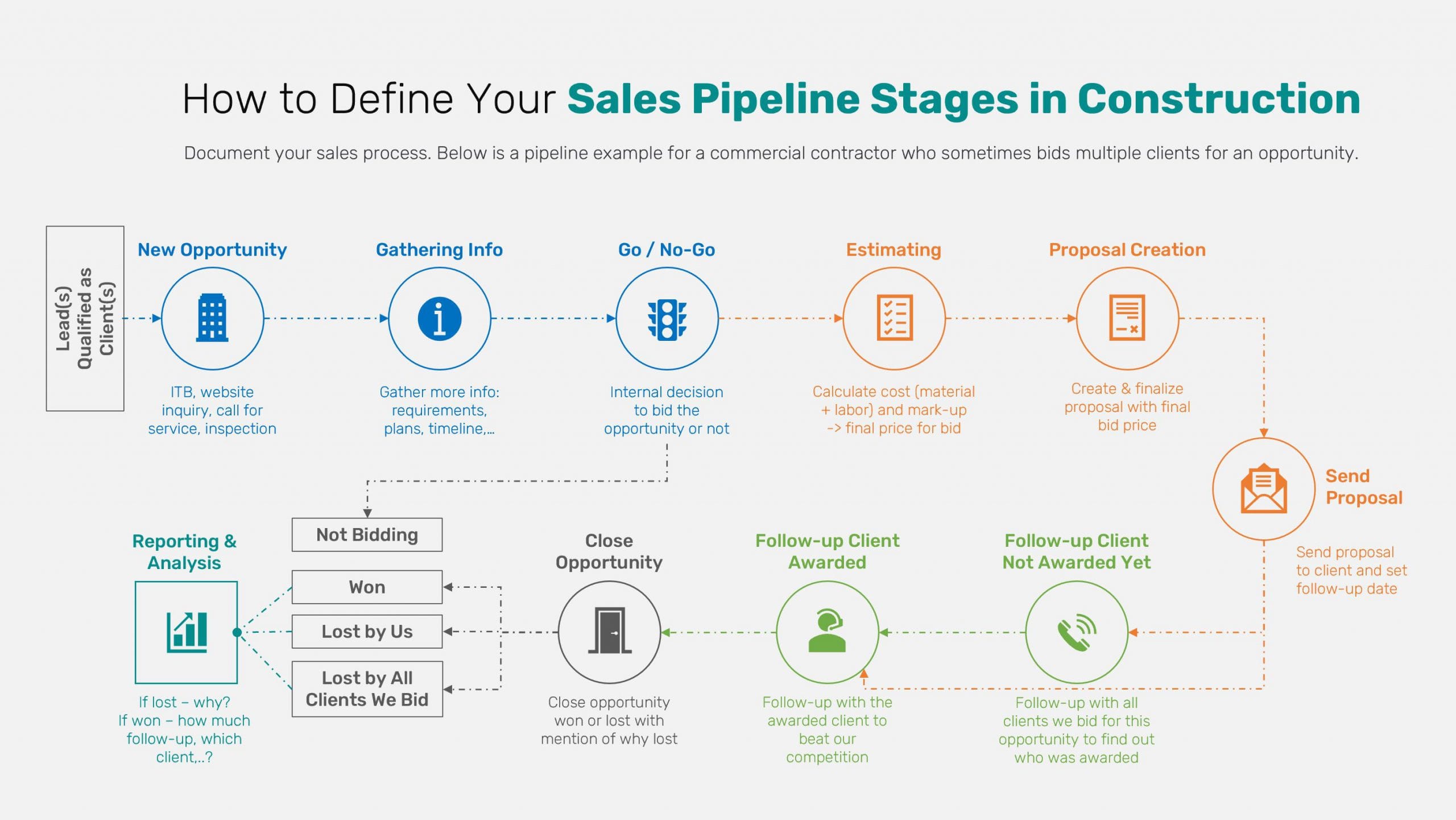
- Building a “Sales Pipeline by Stage” report.
- Adding components to a custom dashboard.
Educational Approach: This part transitions from guided touring to active building. Each step is a block that builds towards a functional, automated sales process.
Implementation Guidance: We provide a real-world use case: automatically notifying a sales manager when a high-value lead is created. This connects the tutorial directly to a business outcome.
Integration Strategy: The “Lead Source” custom field is introduced as a critical data point for future integration with marketing automation platforms.
Tips & Tricks: Use the “Clone” feature for workflow rules to quickly create variations for different conditions.
Warnings: Before making fields mandatory, ensure all existing records have data for that field, or the records will become un-editable until they are updated.
YMYL Compliance: Discusses data validation rules to ensure the accuracy and integrity of critical information like deal value and contact information.
Visual Aid: A flowchart diagram illustrating the logic of the workflow rule (Trigger -> Criteria -> Actions).
Practice Exercise: Create a custom field called “Industry” for Accounts. Then, build a report that groups all open deals by “Industry.”
Time Estimate: 5-7 hours spread over the first week.
Success Metrics:
- Educational: User can create a workflow rule with at least two distinct actions.
- Business: A live sales dashboard is created, providing real-time visibility into the sales pipeline.
To gain deeper understanding of Zoho CRM’s comprehensive capabilities, explore our detailed Zoho CRM Overview and Features guide.
Part 3: Advanced Automation and Developer Workflows (The First Month)
Learning Objectives:
- Understand and implement process enforcement with Blueprints.
- Write a basic Deluge script for a custom function.
- Understand the fundamentals of API integration and authentication (OAuth 2.0).
- Connect Zoho CRM to Zoho Analytics for advanced reporting.
Procedures Covered:
- Creating a Blueprint to standardize the deal closure process.
- Writing a Deluge script to fetch data from an external API and update a CRM record.
- Setting up an API client in the Zoho API Console.
- Outlining a Python script to fetch related records using the Zoho CRM SDK.
- Building a Sales Velocity dashboard in Zoho Analytics.
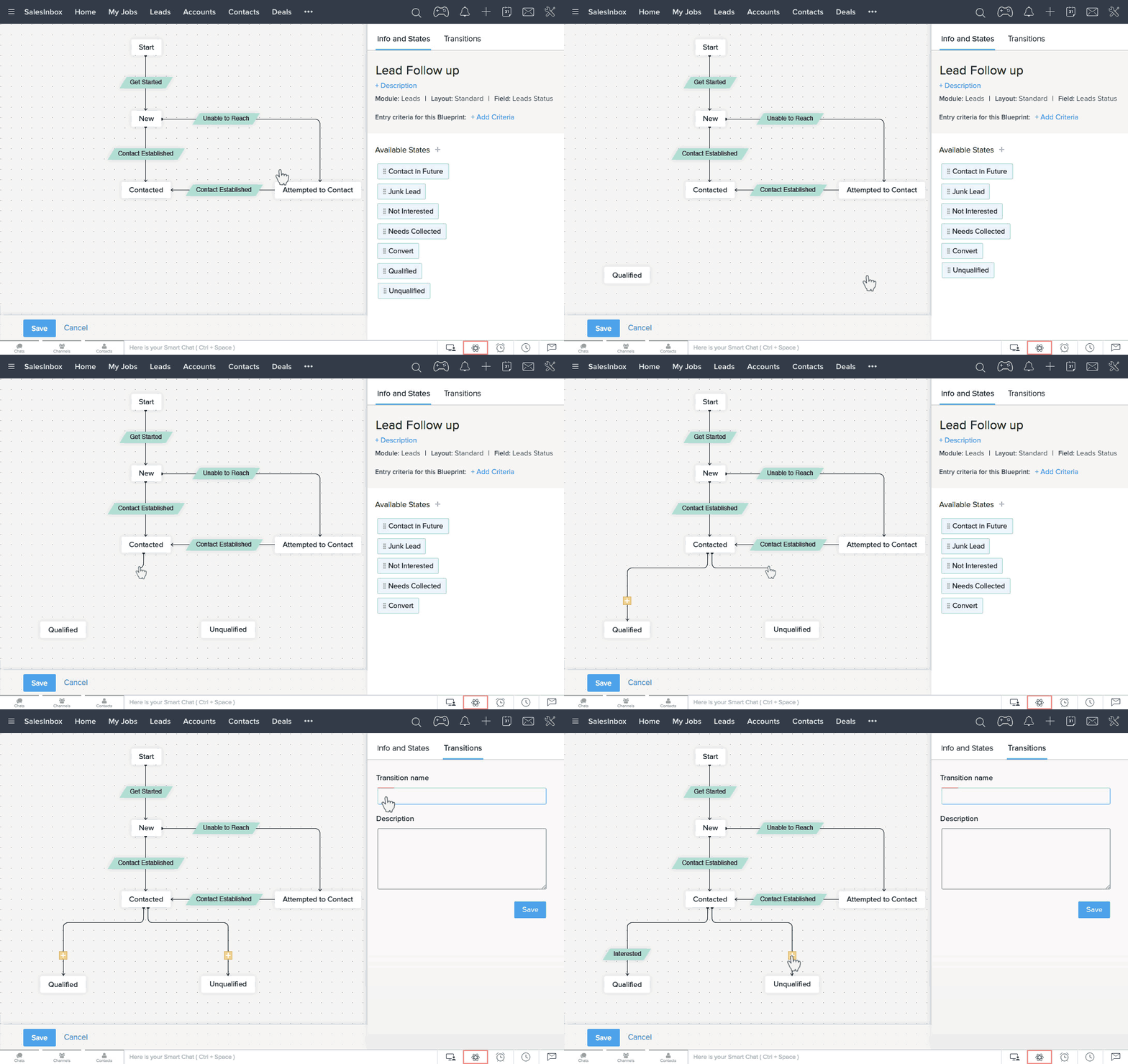
Educational Approach: This section is for power users and developers. It provides code snippets and explains the logic behind the script, focusing on practical, high-impact use cases.
Implementation Guidance: We provide a full implementation example for a “Deal Won” automation that triggers a webhook to an external finance system, demonstrating a real-world cross-platform workflow. For complex projects like this, we recommend that businesses without dedicated developers consult a certified professional to ensure a secure setup.
Integration Strategy: This part is entirely focused on integration, covering both internal (Zoho Analytics) and external (custom apps via API) scenarios.
Tips & Tricks: Always use Zoho’s built-in Connections to store API keys and credentials securely, never hardcode them in Deluge scripts.
Warnings: Respect API rate limits. Design applications to handle potential limits by using bulk operations and webhooks instead of constant polling.
YMYL Compliance: The section on API security emphasizes secure credential storage (Connections) and the importance of using OAuth 2.0, directly addressing data protection.
Visual Aid: A sequence diagram showing the OAuth 2.0 authentication flow between a custom application and Zoho’s servers.
Practice Exercise: Create a simple Blueprint for the Leads module that requires a “Call Note” to be added before a lead can be converted.
Time Estimate: 10-15 hours.
Success Metrics:
- Educational: User can successfully create and trigger a custom function using Deluge.
- Business: At least one critical business process is standardized and enforced using a Blueprint, significantly reducing process deviations by ensuring all users follow a standardized, mandatory workflow for critical operations.
Part 4: The All-in-One Use Case: A Unified Lead-to-Support Journey
Learning Objectives:
- Visualize how data flows seamlessly across different Zoho applications.
- Understand the value proposition of an integrated “All-in-One” platform.
- Map the customer lifecycle to specific modules and applications.
Procedures Covered:
A conceptual walkthrough of a customer journey:
- Lead Capture (
Zoho Forms) - CRM Entry & Nurturing (
Zoho Campaigns) - Sales Engagement (
Zoho CRM) - Project Onboarding (
Zoho Projects) - Customer Support (
Zoho Desk)
Educational Approach: This is a narrative-driven section that connects all the previously learned concepts into a single, cohesive story.
Implementation Guidance: This serves as a strategic blueprint for companies looking to implement the full Zoho One suite. It highlights the key integration points between applications.
Integration Strategy: The entire section is a case study on integration, demonstrating the power of the Zoho ecosystem.
Tips & Tricks: When integrating multiple Zoho apps, use the built-in connectors first before resorting to custom API calls, as they are easier to maintain.
Warnings: Implementing the full suite at once can be overwhelming. A phased approach, starting with CRM and then adding other apps like Desk or Campaigns, is recommended.
YMYL Compliance: Highlights the security benefit of an integrated ecosystem: customer data remains within a single, secure environment, reducing the risks associated with third-party data syncs.
Visual Aid: An infographic mapping the customer journey across the different Zoho application logos.
Practice Exercise: In a trial account, set up the Zoho CRM and Zoho Desk integration. Create a contact in CRM and see how they appear in Desk, then create a ticket to see the data sync back to CRM.
Time Estimate: 1 hour (conceptual understanding).
Success Metrics:
- Educational: User can articulate the data flow from a marketing lead to a sales deal to a support ticket.
- Business: Stakeholders develop a strategic roadmap for adopting additional Zoho applications to reduce tool sprawl.
For insights on how Zoho CRM compares to other leading platforms, check out our comprehensive analysis of Best 10 All-in-One CRM Platforms.
Part 5: Security & Data Management (YMYL Compliance Checklist)
Learning Objectives:
- Configure user roles and profiles to enforce the principle of least privilege.
- Implement network security and strong authentication measures.
- Understand how to use the Audit Log for monitoring.
Procedures Covered:
- Configuring Profiles (disabling export permissions).
- Configuring Roles (building the organizational hierarchy).
- Setting up IP Restrictions.
- Enforcing Multi-Factor Authentication (MFA).
- Navigating and reviewing the Audit Log.
Educational Approach: This section is presented as an actionable checklist that an administrator can follow to secure their CRM instance.
Implementation Guidance: This is a direct implementation plan for CRM security. We provide clear, step-by-step instructions for each security measure.
Integration Strategy: Discusses integrating with Single Sign-On (SSO) providers like Google Workspace or Azure AD for centralized and secure user authentication.
Tips & Tricks: Regularly clone your “Admin” profile to a “Super User” profile and remove critical permissions like “User Management” and “Data Export.” Use this for daily tasks instead of the full admin account.
Warnings: A change in a user’s Role can have wide-ranging data visibility implications. Always test role changes in a sandbox environment before deploying to production.
YMYL Compliance: This entire section is dedicated to YMYL compliance, covering data security, access control, and privacy protection in detail.
Visual Aid: A screenshot of the Profile permissions screen, highlighting the “Export” permission being disabled.
Practice Exercise: Create a new user profile named “Sales Rep – No Export” and disable the export permissions for all modules.
Time Estimate: 2-3 hours.
Success Metrics:
- Educational: Administrator can successfully configure a new profile with restricted permissions.
- Business: 100% of users are enabled with MFA, and at least 90% of non-admin users have data export permissions disabled.
If you’re evaluating whether Zoho CRM is the right choice for your business, our in-depth Zoho CRM Review provides expert analysis and real-world performance assessments.
Important Disclaimers:
Technology Evolution Notice:
The information about Zoho CRM Tutorials and Usecase and AI CRM Software tools presented in this article reflects our thorough analysis as of 2025.
Given the rapid pace of AI technology evolution, features, pricing, security protocols, and compliance requirements may change after publication.
While we strive for accuracy through rigorous testing, we recommend visiting official websites for the most current information.
Professional Consultation Recommendation:
For AI CRM Software applications with significant professional, financial, or compliance implications, we recommend consulting with qualified professionals who can assess your specific requirements and risk tolerance.
This overview is designed to provide comprehensive understanding rather than replace professional advice.
Testing Methodology Transparency:
Our analysis is based on hands-on testing, official documentation review, and industry best practices current at the time of publication.
Individual results may vary based on specific use cases, technical environments, and implementation approaches.
Frequently Asked Questions About Zoho CRM Tutorials and Usecase
How Long Does It Take to Learn Zoho CRM?
For a standard user, mastering the core functionalities like lead and deal management can be achieved within the first week (5-10 hours of focused use).
For administrators looking to implement customization and automation, a timeline of 3-4 weeks is more realistic to become proficient.
Power users or developers aiming to leverage Deluge scripting and API integrations should budget for at least a month of consistent learning and practice.
What Is the Most Common Mistake When Implementing Zoho CRM?
The most common mistake is poor data management from the start.
This includes importing messy or duplicate data, not defining a clear sales process (pipeline stages), and giving too many users administrator-level permissions.
To avoid this, always cleanse your data before import, map out your business processes before customizing, and implement a strict security model based on the principle of least privilege.
Can Zoho CRM Replace Multiple Software Tools?
Yes, absolutely. As an All-in-One CRM Platform, Zoho CRM, especially when bundled with Zoho One, is designed to reduce tool sprawl.
It can replace separate applications for email marketing (Zoho Campaigns), customer support (Zoho Desk), project management (Zoho Projects), and analytics (Zoho Analytics), creating a single source of truth for all customer data and interactions.
For businesses considering alternatives, our detailed comparison guide on Zoho CRM Top Alternatives and Competitors can help you make informed decisions.
What Is the ROI of Implementing Zoho CRM Automation?
The ROI can be significant. By automating routine tasks like lead assignment, follow-up reminders, and welcome emails, businesses can significantly reduce administrative workload.
Implementing Zia’s predictive lead scoring can increase lead conversion rates by identifying and prioritizing hot leads.
A typical small business can expect to see a positive ROI within 6-9 months of a well-executed implementation, though actual results vary based on implementation quality and business context.
How Secure Is Customer Data in Zoho CRM?
Zoho CRM employs a robust security framework. Data is encrypted both in transit (TLS 1.2/1.3) and at rest (AES-256).
The platform holds key compliance certifications like SOC 2 Type II and ISO 27001, and is GDPR compliant.
However, platform security is only part of the equation. It is crucial for administrators to enforce strong security policies like Multi-Factor Authentication (MFA), IP restrictions, and strict user profiles to prevent unauthorized access.
Zoho CRM vs. Salesforce: What’s the Main Difference for a Small Business?
The primary difference lies in the balance of complexity, cost, and all-in-one functionality.
Zoho CRM is generally considered more user-friendly and affordable for small businesses, offering a comprehensive suite of integrated applications (Zoho One) under a single, predictable license.
Salesforce is exceptionally powerful and customizable but often requires more extensive configuration, specialized developer resources, and carries a higher total cost of ownership, making it a better fit for large enterprises with complex needs.
What Does Zoho’s AI Assistant, Zia, Actually Do?

Zia is an AI-powered assistant that provides actionable intelligence. Key functions include:
- Predictive Lead Scoring: Analyzes historical data to score new leads based on their likelihood to convert.
- Best Time to Contact: Suggests the optimal time to call or email a contact based on their past interactions.
- Anomaly Detection: Alerts you to unusual dips or spikes in your sales trends.
- Task Automation: Zia can interpret email intent to suggest creating a follow-up task or meeting automatically.
My Workflow Rule Isn’t Working. What Should I Check First?
First, check the Audit Log (Setup > Data Administration > Audit Log) to see if the rule even attempted to trigger.
If not, the issue is likely with the trigger criteria. Double-check that:
- The rule is set to trigger on the correct action (
Create,Edit, orCreate/Edit). - The record you are testing meets all the specified criteria exactly. A common mistake is a mismatch in a picklist value or a date field.
- The rule is active.
For more detailed troubleshooting and expert tips, visit our comprehensive Zoho CRM FAQs resource center.


Leave a Reply