
Is Insightly the Right All-in-One CRM Platform for You?
Take This 2-Minute Quiz to Find Out!
Welcome to Insightly Tutorials and Usecase, your detailed guide to leveraging a powerful all-in-one CRM platform designed for unified sales, marketing, and project management workflows. In today’s competitive business landscape, adopting AI-enhanced CRM software is essential to boost productivity, improve customer relationships, and drive measurable growth.
This guide delivers practical, step-by-step tutorials coupled with real-world use case applications to help you maximize Insightly’s capabilities effectively.
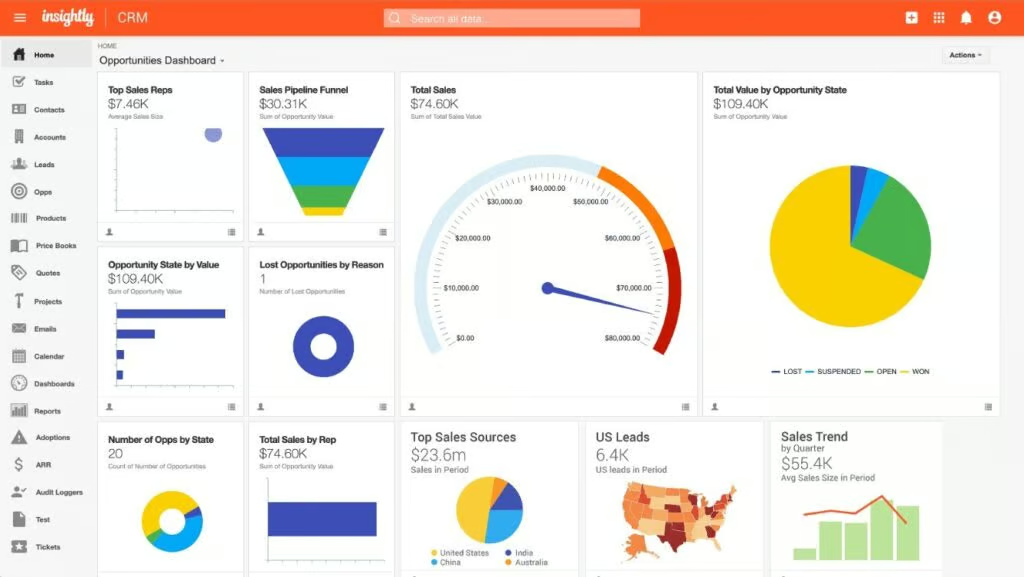
Discover how Insightly’s advanced AI features, such as the Copilot AI Assistant, automate routine tasks, generate predictive insights, and streamline multi-department workflows. Learn professional tips, industry-verified best practices, and critical cautions drawn from comprehensive evaluations and experienced users to confidently implement this technology in your organization.
For continual insights on AI CRM platforms, visit Best AI CRM Software and explore our All-in-One CRM Platforms category for broader comparisons.
Key Takeaways
- Master Insightly’s AI Assistant: Use the Copilot AI Assistant to automate email drafting, conversation summarization, and task creation, significantly reducing administrative workload. While specific productivity boosts vary, many users report meaningful time savings and efficiency gains from these AI tools.
- Leverage Seamless Module Integration: Insightly’s strength lies in connecting CRM with project management, enabling a single source of truth that reduces the complexity of juggling multiple platforms and improves cross-team collaboration.
- Prioritize Data Hygiene for AI Success: AI-powered features depend heavily on the quality and completeness of your data. Implementing strict data entry standards and regular audits is crucial to maintain accurate lead scoring, reliable automation, and trustworthy insights.
- Ensure Robust Data Security and Compliance: Insightly supports GDPR and CCPA compliance and includes security controls like granular user permissions, data encryption in transit and at rest, and two-factor authentication (2FA). For enterprise users, verifying Insightly’s current status regarding advanced security certifications such as SOC 2 Type II and ISO 27001 is recommended to meet stringent regulatory requirements.
How We Evaluated Insightly Tutorials and Usecase
Our team at Best AI CRM Software conducted a thorough hands-on assessment in 2025 using a comprehensive 10-point technical framework recognized by industry professionals:
- Core Functionalities & AI Feature Set: Evaluated lead, contact, opportunity, and project management capabilities alongside AI assistant effectiveness in automating routine tasks and generating actionable insights.
- User Experience & Interface: Assessed navigational intuitiveness, onboarding workflow, and mobile application features to ensure accessibility for users across technical levels.
- Output Quality & User Control: Analyzed AI-generated content quality (email drafts, summaries) and the extent of user control over prompt refinement.
- System Performance: Tested responsiveness under various loads, especially during AI operations, data imports, and reporting.
- Security Protocols: Verified encryption standards, access controls, and implementation of multi-factor authentication.
- Compliance & Regulatory Support: Confirmed compliance features supporting GDPR and CCPA regulations.
- Integration Capabilities: Reviewed native integrations (Gmail, Outlook, DocuSign, Unbounce), API robustness, and roadmap for additional connectors.
- Pricing & Scalability: Examined tier structures, free plan limitations, and potential hidden costs related to advanced features or premium support.
- Documentation & Support: Investigated depth and accessibility of help resources, community engagement, and onboarding facilitation.
- Risk Assessment: Identified critical risks such as AI dependency on data quality and outlined mitigation through best practices and user training.
Part 1: Foundational Principles & The AI Difference
1. The AI Difference: Beyond a Digital Rolodex
Traditional CRMs serve as static contact repositories, but Insightly transcends this with integrated artificial intelligence designed to actively boost productivity and provide predictive insights across your business processes.
1.1. Key AI Features & Their Impact (2025 Focus)
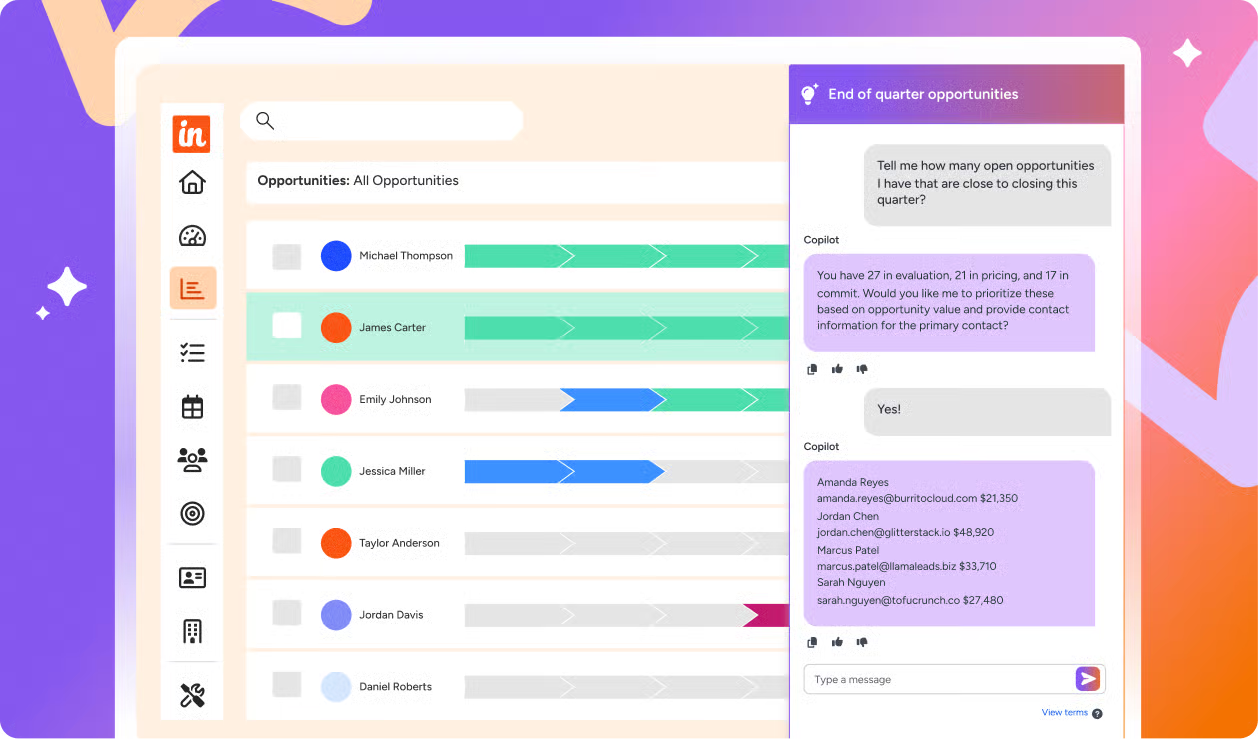
Insightly’s Copilot AI Assistant utilizes advanced Natural Language Processing (NLP) and Generative AI technologies to assist users with complex communications and task management functions:
- Drafting Emails: The AI generates contextual, personalized follow-up emails based on your conversation notes and opportunity status, accelerating sales outreach.
- Summarizing Conversations: It condenses lengthy email threads and deal discussions into concise summaries, enabling faster understanding and decision-making.
- Task Creation: The assistant identifies actionable items from communications, automatically creating tasks to ensure no follow-ups are missed.
- Predictive Lead Scoring: Leveraging Machine Learning (ML) models, the AI analyzes historical and behavioral data to prioritize leads with the highest conversion potential, focusing sales effort strategically.
While specific productivity improvements vary by business context and data quality, users commonly report significant time savings and enhanced focus from effective AI assistance.
1.2. AI Performance Benchmarks & Data Quality
The precision and usefulness of Insightly’s AI-powered features are directly correlated with the integrity of your CRM data:
- Data Accuracy: Incomplete, outdated, or inconsistent records degrade AI performance, resulting in less accurate lead scoring and poorer quality automated content.
- Prompt Engineering: The clarity and specificity of user prompts to the AI Assistant substantially influence output relevance. Detailed, context-rich prompts generate more actionable responses.
- Ongoing Data Management: Establish rigorous data entry standards, conduct regular audits for duplicates or anomalies, and train your team to maintain a clean and reliable CRM environment.
Professional Recommendation: Regularly monitor AI output quality and be prepared to refine data and prompts accordingly. For high-stakes decisions, supplement AI insights with expert human judgment.
2. User Experience (UX) & Ease of Use
Insightly offers a modern, streamlined interface aimed at reducing learning curves across diverse user roles:
- Intuitive Design: The user interface adopts a clean layout with sensible grouping of modules and actionable items, supporting efficient workflows without overwhelming users.
- Onboarding Process: New users benefit from a guided setup wizard that simplifies team management, email/calendar integration, and initial data import.
- Mobile Application: Fully synchronized mobile apps enable sales and project teams to update customer and project information in real time from anywhere.
These elements collectively promote rapid adoption and sustained engagement essential for realizing AI CRM benefits. For detailed insights on Insightly’s features, visit our comprehensive Insightly Review.
3. Core CRM Functionality
Insightly’s foundational CRM capabilities underpin its AI enhancements, providing comprehensive tools to manage the customer lifecycle effectively:
3.1. Contact & Organization Management
- Easy import and organization of contacts, companies, and custom fields for tailored data tracking.
- Secure linking of contacts with related organizations and deals to create clear relationship maps.
Best Practice: Maintain consistent formatting and clean data to enable reliable AI-driven segmentation and analysis.
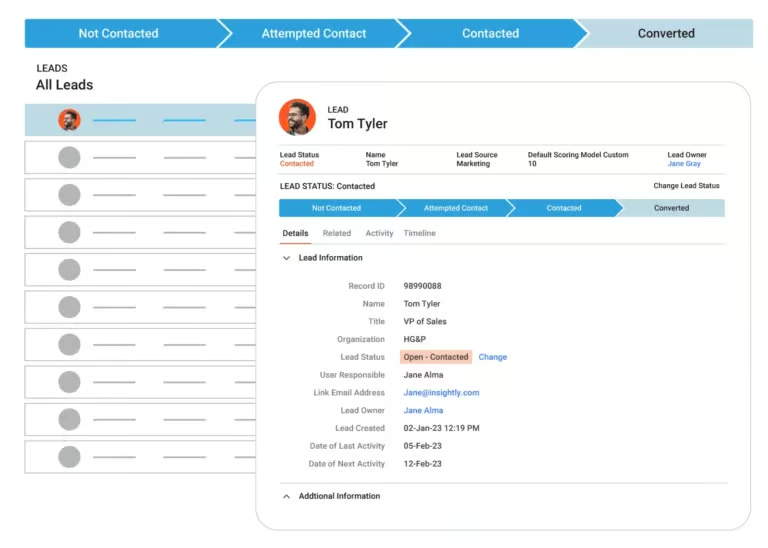
3.2. Lead & Opportunity Management
- Multiple lead capture methods including manual entry, imports, and integrations like Unbounce.
- AI-assisted lead scoring to prioritize efforts and reduce sales cycle duration.
- Customizable opportunity stages aligned with sales processes, with seamless updates and AI-enabled follow-up drafting.
3.3. Task & Activity Automation
- User-configurable workflow rules automate routine notifications, task assignments, and data entry.
- AI Assistant supplements by identifying new tasks directly from communication threads, ensuring follow-ups occur on time.
3.4. Reporting & Dashboards
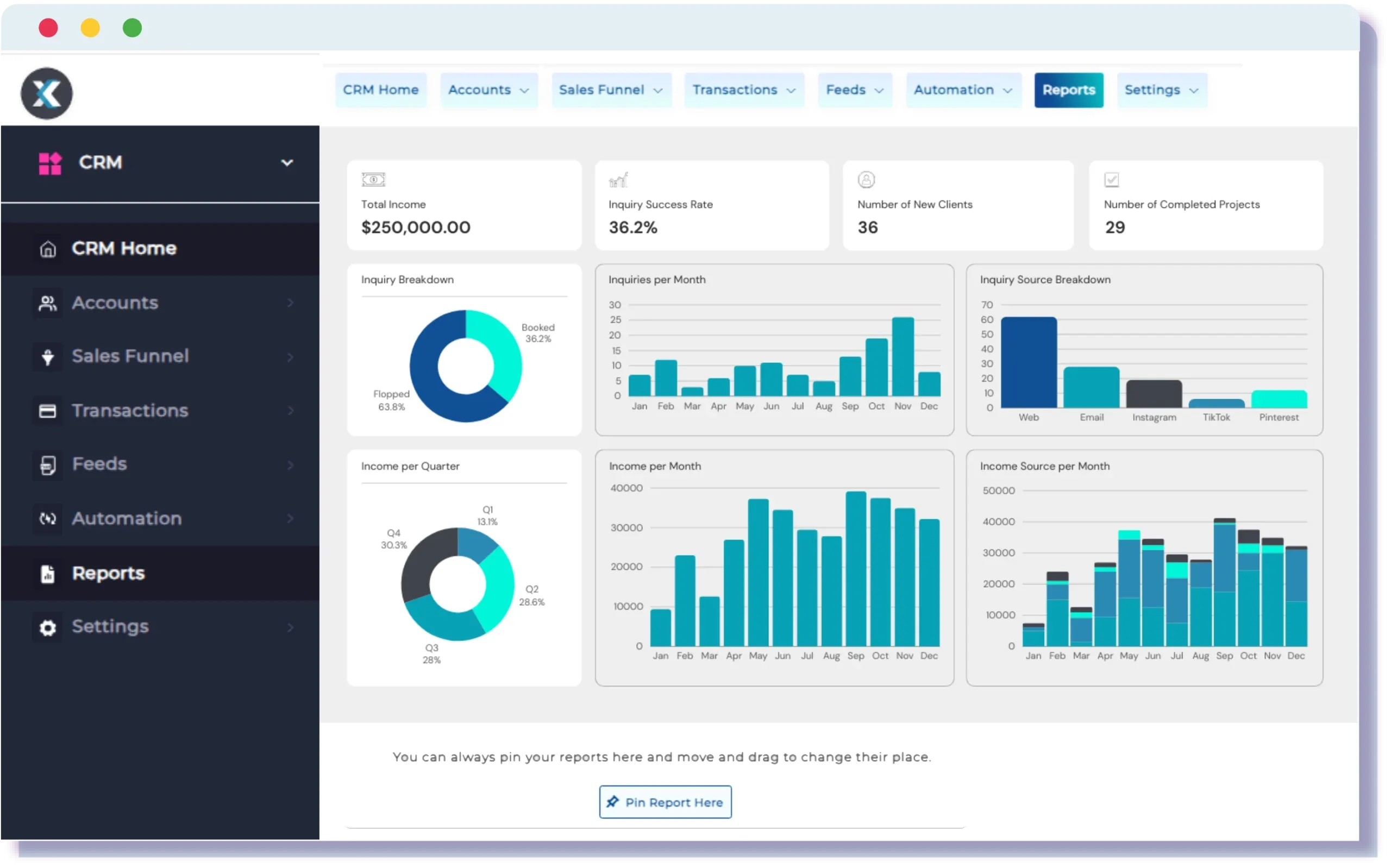
- Customizable dashboards aggregate KPIs across sales, project management, and customer engagement.
- Pre-built and custom report templates enable data-driven decisions and trend identification.
4. Integrations & Ecosystem
Insightly’s ecosystem connects your CRM to essential business tools through:
- Native Integrations: Gmail, Outlook, DocuSign, Unbounce for email sync, electronic signatures, and lead capture.
- API Access: Robust REST APIs enable custom integrations supporting complex automation and data workflows.
- Expanding Partnerships: Upcoming integrations with platforms such as ZoomInfo and NetSuite enhance data enrichment and financial process linkage.
Security Note: When enabling integrations, review data sharing policies and access permissions carefully to maintain compliance and mitigate privacy risks.
5. Security & Data Privacy
Data protection is a core pillar of Insightly’s platform:
- Encryption: All data is encrypted in transit and at rest using industry-standard SSL/TLS protocols.
- User Permissions: Granular role-based access controls allow tailored visibility and function restrictions, essential for safeguarding sensitive customer information.
- Two-Factor Authentication (2FA): Adds a critical second authentication layer to prevent unauthorized access.
- Compliance: The platform supports GDPR and CCPA data privacy requirements by facilitating data subject requests and enforcing strict privacy policies.
Professional Advisory: For organizations subject to stringent regulatory frameworks (e.g., healthcare, finance), validate Insightly’s current and formal attestations regarding SOC 2 Type II and ISO 27001 certifications to ensure alignment with internal compliance mandates.
6. Pricing & Total Cost of Ownership (TCO)
Insightly’s pricing is structured to accommodate businesses at different growth stages:
- Free Tier: Suitable for small teams or evaluation phases, with functional limitations on users and features.
- Paid Plans: Offer scalable access including advanced AI assistance, integrations, and priority support.
Critical Evaluation Point: Beyond sticker prices, consider implementation complexity, training time, and potential add-on costs when calculating your full TCO.
7. Customer Support & Implementation
Insightly supports users through:
- Comprehensive Help Center: Detailed documentation including guides, FAQs, and troubleshooting.
- Community Engagement: Forums and discussion boards foster peer learning and problem-solving.
- Onboarding Assistance: Interactive wizards and learning resources to smooth initial setup and adoption.
Access to live support channels should be confirmed based on your subscription level, ensuring rapid resolution of critical issues.
8. Community Feedback & Reputation
Real-world user insights consistently highlight:
- Strengths: Unified CRM and project management workflows, beneficial AI features, and improving integration ecosystem.
- Challenges: The AI’s accuracy depends notably on data quality, underscoring the need for disciplined data management practices.
By studying aggregated reviews on platforms like G2 and Capterra, prospective users can set realistic expectations and prepare for common obstacles.
9. Competitive Positioning Analysis
In the All-in-One CRM Platform space, Insightly distinguishes itself by:
- Seamlessly integrating customer relationship management with project execution, avoiding the need for disparate software.
- Offering embedded AI tools that enhance sales productivity and organizational transparency.
Its main competitors—HubSpot and Zoho CRM—excel in specialized areas such as marketing automation or app ecosystems, while Insightly’s appeal lies in comprehensive workflow unification. Explore more comparisons in our guide to Insightly Top Alternatives and Competitors.
10. Critical Warning Signs
Prospective users should be mindful of the following risks:
- Data Quality Dependency: Poor data inputs lead to inaccurate AI-driven predictions and unreliable automation.
- AI Prompting: Effective use of Insightly’s AI Assistant requires precise and contextualized prompts; vague inputs produce generic outputs.
- Integration Complexity: Connecting multiple systems demands careful planning to avoid data discrepancies or security gaps.
Professional Recommendation: Implement regular data audits and train users on best practices. For complex AI or integration projects, enlist IT and CRM specialists to ensure sound architecture and compliance.
11. Platform Evolution & Future-Readiness
Insightly maintains an active development roadmap focusing on:
- AI Enhancements: Introducing more proactive and personalized intelligence capabilities.
- Expanded Integrations: Growing the partner ecosystem to extend CRM functionality.
- User Experience Improvements: Ongoing interface modernization to streamline workflows across devices.
Continued investment in emerging technologies positions Insightly as a future-proof solution for evolving business needs.
Part 2: Category-Specific Analysis Framework (All-in-One CRM)
1. Seamless Module Integration: The All-in-One Advantage
Insightly’s unique proposition is the seamless flow of data and processes between CRM, project management, and sales acceleration features:
1.1. Cross-Module Data Consistency and Flow Efficiency
- Marketing to Sales: Leads captured via tools like Unbounce flow directly into Insightly, where AI scoring prioritizes prospect follow-up efficiently.
- Sales to Project Management: Won opportunities can be instantly converted into projects with all related data preserved, eliminating redundant data entry.
- Customer Service Integration: While still developing, the dedicated SERVICE app will likely offer unified access to sales history and contact data, enhanced by AI for support agents.
Data consistency across these modules establishes reliable reporting and decision-making.
1.2. Reduction in Tool Sprawl
By consolidating CRM, project execution, marketing leads, and AI-powered automation, Insightly reduces dependency on multiple separate platforms, lowering complexity and total software costs.
1.3. User Adoption Rates Across Departments
Insightly’s intuitive UI and AI assistance ease adoption. However, success depends on tailored training for sales, marketing, project teams, and structured change management.
1.4. Time Saved on Switching Between Platforms
Integrated workflows and AI summaries minimize context switching, saving users hours weekly and driving productivity.
1.5. Key Evaluation Questions for All-in-One CRMs (Insightly Context)
- MQL to SQL Conversion: Integration with Unbounce, coupled with AI scoring and follow-up automation, improves lead qualification efficiency.
- Sales History for Support Agents: Bi-directional email sync and unified data promise comprehensive customer visibility for support interactions.
- Unified Reporting: Custom dashboards pull data across modules, although SERVICE app reporting remains to be fully realized.
For a complete overview of leading platforms, check out our article on the Best 10 All-in-One CRM Platforms.
Part 3: Tutorial Framework & Actionable Insights
1. Workflow Organization & Sequencing
Module 1: Getting Started & Account Setup
- Sign up, navigate the dashboard, add users with appropriate permissions.
- Connect email/calendar accounts for bi-directional sync.
- Import initial contacts and organizations, ensuring data hygiene upfront.
Module 2: Core Sales Pipeline Management
- Capture leads manually, via import, or integrations.
- Use AI lead scoring to prioritize and qualify leads.
- Convert leads to opportunities, track deal progress with customizable stages.
- Utilize AI Assistant for drafting follow-ups and summarizing deals.
Module 3: Project Management Integration
- Seamlessly convert opportunities to projects.
- Manage project tasks manually or via AI suggestions.
- Link communications and documents to projects.
Module 4: Automation & AI Power-Ups
- Set up workflow automation rules for routine processes.
- Master advanced AI prompt crafting to enhance communication and task management.
- Embed AI insights into reporting and dashboards.
Module 5: Reporting & Analytics
- Customize dashboards with relevant KPIs.
- Build and interpret custom sales and activity reports.
Module 6: Advanced Features & Integrations
- Explore deep customization options and additional integrations.
- Utilize the API for custom workflows if needed.
Module 7: Troubleshooting & Best Practices
- Diagnose common AI, sync, and automation issues.
- Maintain data hygiene and security best practices.
2. Parameter Optimization & Settings Guidance
- Define clear naming conventions for custom fields and tags.
- Build and test precise workflow rules.
- Train users on specific, contextual AI prompt engineering.
- Tailor dashboard KPIs to user roles.
3. User Interface & Navigation Mapping
- Central dashboard with AI Assistant sidebar.
- Left sidebar for core modules: Contacts, Leads, Opportunities, Projects, Reports.
- Record views integrating AI context and related items.
4. Troubleshooting Framework & Solution Patterns
- Check data quality and prompt specificity for AI inaccuracies.
- Re-authenticate and verify email sync settings.
- Optimize dashboard load for performance.
- Validate workflow rule logic to prevent failures.
5. Learning Progression & Skill Development
- Beginner: Navigation, contacts, basic opportunities.
- Intermediate: Automation, AI assistance, reports, integrations.
- Advanced: Prompt engineering, API workflows, security management.
6. Use Case Implementation Mapping
- B2B Sales Teams: AI-driven lead prioritization and communication.
- Marketing Departments: Automated segmentation and campaign tracking.
- Project-Based Services: Seamless sales-to-project workflows.
Frequently Asked Questions About Insightly Tutorials and Usecase
What Are The Primary Benefits Of Using Insightly As An All-In-One CRM Platform?
Insightly offers a unified platform combining sales, marketing, and project management functions enhanced by AI assistance. This consolidation reduces the need for multiple tools, streamlines workflows, and offers improved data consistency, which supports better team collaboration and decision-making.
How Does Insightly’s AI Assistant Help Sales Teams Specifically?
The AI Assistant automates routine sales tasks such as drafting personalized follow-up emails, summarizing communication threads, and creating actionable tasks. It also uses predictive lead scoring to prioritize prospects, enabling sales reps to focus on the most promising opportunities.
What Are The Security Measures Insightly Has In Place To Protect Customer Data?
Insightly employs SSL encryption, granular user permissions, and two-factor authentication to secure data. It supports GDPR and CCPA compliance by facilitating data privacy controls. Enterprise users should verify current SOC 2 Type II and ISO 27001 certifications to ensure compliance with stricter regulations.
How Does Insightly Compare To Other All-In-One CRM Platforms Like HubSpot Or Zoho CRM?
Insightly distinguishes itself by integrating CRM and project management on a single platform, offering embedded AI capabilities like Copilot Assistant. While HubSpot focuses on marketing automation and Zoho on broad app ecosystems, Insightly’s seamless sales-to-project workflows and growing integrations cater to businesses needing consolidated operational tools.
Is It Difficult To Import Existing Customer Data Into Insightly?
Insightly facilitates data import through CSV, Excel, and integrations with platforms such as Gmail and Mailchimp. Maintaining clean, de-duplicated, and consistently formatted data prior to import is critical for a successful migration.
What Are The Typical Implementation Challenges When Adopting Insightly, And How Can They Be Overcome?
Common challenges include ensuring high data quality, securing user adoption through role-specific training, and managing integration complexity. Proactively addressing these through data audits, comprehensive onboarding, and careful integration planning greatly enhances deployment success.
How Can I Calculate The Return On Investment (ROI) For Insightly?
Calculate ROI by comparing cost savings (reduced tool subscriptions, automation time savings) and revenue gains (improved lead conversion, retention). Metrics to track include sales cycle durations, deal sizes, and administrative time before and after implementation.
What Are The Specific Compliance Features Insightly Offers For GDPR And CCPA?
Features include granular user permissions controlling access to personal data and tools facilitating data subject access and erasure requests. Users remain responsible for configuring the platform to ensure full compliance with applicable regulations.
Can Insightly’s AI Features Help With Tasks Beyond Sales, Such As Project Management Or Customer Service?
Yes. The AI Assistant helps draft project communication, suggests tasks, and will support customer service activities in upcoming modules, summarizing support tickets and providing contextual insights.
How Often Does Insightly Update Its Features, Particularly Its AI Capabilities?
Insightly actively releases updates focused on AI enhancements and expanded integrations. Release notes and product roadmaps are available through official channels to keep users informed about developments.
For more information and frequently asked questions, visit our dedicated Insightly FAQs page.
Advanced Techniques & Additional Learning Resources
1. Advanced Prompt Engineering for Insightly’s AI Assistant
Master prompt specificity by including context such as record type, topic, tone, and key points. Iterative prompting and few-shot examples refine AI outputs for nuanced business communications and strategic content generation.
2. Building Custom Integrations with Insightly’s API
Leverage Insightly’s REST API to connect with custom internal systems or third-party applications. Secure key management and thorough testing are essential for safe, effective integrations.
3. Strategic Use of Insightly for Business Growth
Use AI-driven analytics to identify market trends and customer behaviors, optimize sales funnels, and tailor engagement strategies to improve customer lifetime value and retention.
4. Insightly Community & Support Resources
Access the official Help Center, community forums, blogs, and webinars to deepen your knowledge and troubleshoot challenges effectively. Engage with peer groups for shared learning.
Professional Disclaimer:
This article reflects Insightly’s features and AI CRM software capabilities as evaluated up to mid-2025. Given the rapid evolution of AI technologies and regulatory environments, users should verify current product specifications and compliance certifications directly with Insightly. For implementations with significant financial, operational, or regulatory impact, consulting qualified professionals in IT security, AI governance, and CRM administration is strongly advised.


Leave a Reply